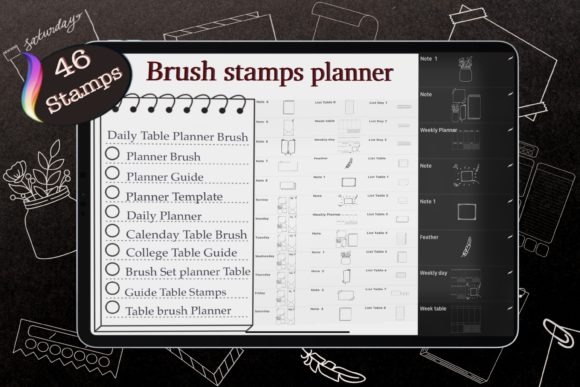
46 Planner Stamps: Build Your Digital Calendar Fast
Digital planning has evolved from a niche hobby into a robust workflow for professionals, educators, and creatives alike. The shift from paper to screen offers unparalleled flexibility, yet one bottleneck remains: the time-consuming process of setting up calendars. Manually drawing grids, aligning dates, and ensuring every month starts on the correct day can drain creative energy before you even begin organizing your life or business. This is where the 46 Planner Stamps, Brush Stamp Planner collection transforms the workflow. By providing a comprehensive suite of pre-dated calendar brushes, this toolset allows you to bypass the tedious setup and focus immediately on high-value planning and design.
At its core, this collection is about efficiency without sacrificing aesthetics. It includes 46 distinct Procreate stamp brushes designed specifically for digital planners and journals. The set covers every month of the year, offering both Monday-start and Sunday-start variations. Whether you adhere to the ISO standard of starting the week on Monday or prefer the traditional Sunday start common in North American planning, these brushes accommodate your specific needs. Instead of wrestling with table tools or importing static images that lose quality when resized, you simply select the brush, tap your canvas, and instantly have a perfectly formatted calendar ready for customization.
Streamlining the Creation Process
The primary value of these Procreate planner stamp brushes lies in their ability to standardize your output while saving hours of labor. For small business owners selling digital planners or freelancers creating custom layouts for clients, consistency is key. Using a dedicated brush set ensures that every monthly spread maintains the same line weight, font style, and grid proportions. This uniformity builds a professional brand identity that hand-drawn elements often struggle to achieve across hundreds of pages.
Consider the practical application for an educator creating a semester planner for students. With the calendar brush stamps, you can generate a full academic year's worth of monthly views in minutes. You are not locked into a rigid black-and-white format; the true power emerges when you treat these stamps as a base layer. Once stamped, the calendar becomes a vector-like object within your raster canvas. You can resize it to fit any page dimension, change the color of the lines to match your theme, or add background colors behind the dates. This flexibility means a single brush set can yield infinite design variations, from minimalist monochrome layouts to vibrant, color-coded schedules.
Creative Applications Across Industries
The utility of 46 Planner Stamps, Brush Stamp Planner extends far beyond personal organization. Different sectors can adapt these tools to solve unique problems:
- Content Creators and Marketers: Use the daily table planner brushes to map out content calendars. Visualizing a whole month at a glance helps in spotting gaps in posting schedules or balancing promotional content with educational material.
- Project Managers: Adapt the monthly stamps for high-level roadmap visualizations. By stripping away the decorative elements and focusing on the grid, you create a clean slate for tracking milestones and deadlines across multiple quarters.
- Habit Trackers and Wellness Coaches: Combine the date stamps with custom icons to build specialized habit trackers. The pre-set dates ensure accuracy, allowing you to focus on designing the tracking mechanism itself, such as mood rings or water intake logs.
- Teachers and Tutors: Create assignment trackers or lesson plan books. The ability to switch between Monday and Sunday starts is particularly useful here, as different school districts and curricula follow different weekly structures.
Technical Workflow and File Management
Integrating these brushes into your workflow requires a basic understanding of how Procreate handles layers and exports. When you use the line brush or calendar stamp, it appears on your active layer. For the best results, it is recommended to keep your structural elements (like the calendar grid) on a separate layer from your handwritten notes or decorative stickers. This non-destructive approach allows you to move the calendar around if your layout shifts or adjust its opacity without affecting the rest of your design.
A standout feature of this set is its versatility for export. If you are building a hyperlinked PDF for GoodNotes or Notability, you might need transparent PNGs of your monthly spreads. To achieve this, simply turn off the bottom background layer in Procreate after placing your stamp and adding any desired background colors or borders. Then, crop the canvas to the specific month and save it to your iPad photos as a PNG. Alternatively, if you prefer a solid white or colored box behind your month stamp for a printed look, you can place a shape layer beneath the stamp, crop the canvas, and export directly. This dual capability makes the set suitable for both fully digital interactive planners and printable physical inserts.
Designing for Clarity and Usability
While speed is a major benefit, usability should never be compromised. When using bullet journal brushes or calendar stamps, keep the end-user in mind. If you are designing for yourself, choose a style that sparks joy and encourages consistent use. If you are designing for an audience, prioritize legibility. Ensure that the date numbers are large enough to be written on digitally with a stylus. The included planners Brush Guide Table is an excellent resource for understanding the specific dimensions and best-use cases for each of the 46 brushes.
Variation is essential to prevent planner fatigue. Even with a standardized grid, you can alter the user experience by changing the context. Try using a soft pastel background for a wellness journal, a stark high-contrast grid for a financial tracker, or a textured paper overlay for a vintage-style diary. The 46 procreate stamps provide the skeleton; your creative direction provides the soul. By mixing these stamps with other digital assets like washi tape brushes or handwritten fonts, you create a cohesive ecosystem that feels bespoke rather than templated.
Maximizing Value Through Organization
To get the most out of this instant download digital product, organization is paramount. With 46 brushes in the set, finding the right month quickly can become challenging if they are not categorized. In Procreate, create separate brush sets for "Monthly Calendars," "Weekly Views," and "Daily Tables." Further divide them by "Monday Start" and "Sunday Start." This simple organizational step reduces friction during the design process, keeping you in a state of flow.
It is also important to respect the intellectual property associated with these tools. As noted in the legal guidelines, file sharing, copying, selling, or claiming these brushes as your own is prohibited. These assets are licensed for your personal use or for use within finished projects (like a completed planner page), but the brushes themselves cannot be redistributed. Adhering to these terms supports the creators who invest time in developing precise, high-quality tools that enhance our collective productivity.
Ultimately, the goal of using 46 Planner Stamps, Brush Stamp Planner is to reclaim your time. By automating the repetitive task of date entry, you free up mental bandwidth for strategic thinking, creative expression, and actual planning. Whether you are an entrepreneur mapping out a product launch, a student organizing a thesis timeline, or a parent coordinating family activities, these tools offer a reliable foundation. They bridge the gap between the desire for a beautiful, organized life and the practical reality of limited time, proving that with the right digital assets, you can build a calendar system that works as hard as you do.