Procreate Geometric Universe Stamps: 50 Shapes
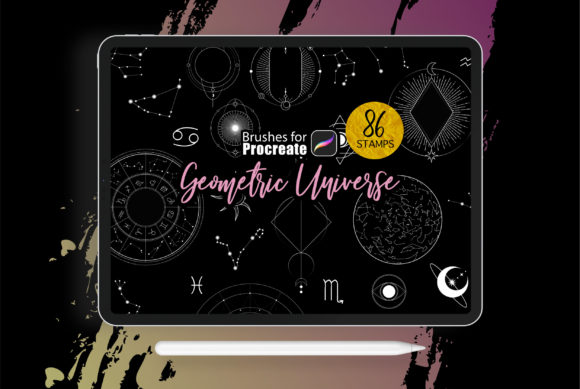
Digital art often feels like it requires hours of sketching perfect lines and calculating angles before you can even start coloring. That is where Procreate - Geometric Universe Stamps changes the game for artists on the iPad. This collection includes 50 specialized brushes designed to instantly place crisp, clean geometric shapes and graphics onto your canvas. Whether you are a seasoned illustrator looking to speed up your workflow or a beginner who struggles with drawing straight lines, these tools offer a shortcut to professional-looking results without sacrificing creativity.
The core appeal of this brush set lies in its versatility. These are not just static images; they are dynamic brushes that respond to your Apple Pencil. You can resize, rotate, and layer them to build complex patterns, futuristic backgrounds, or intricate mandala designs in seconds. Because the pack contains 50 unique variations, you have a massive library of elements at your fingertips, ranging from simple circles and triangles to more elaborate cosmic and structural forms. This variety ensures that your digital compositions never feel repetitive or generic.
Why Geometric Tools Matter for Modern Creators
In today's visual landscape, geometry is everywhere. From the logos on your favorite apps to the patterns on trendy clothing, clean lines and structured shapes define modern aesthetics. However, drawing these by hand on a tablet can be frustratingly difficult. Even with steady hands, achieving perfect symmetry and consistent spacing takes time. Procreate - Geometric Universe Stamps solves this problem by handling the heavy lifting of precision.
For entrepreneurs and small business owners creating their own marketing materials, this efficiency is invaluable. Imagine needing a social media post with a sleek, tech-inspired background. Instead of spending an hour trying to align vectors, you can stamp down a few geometric elements, adjust their opacity, and have a polished design ready in minutes. Freelancers and marketers can use these brushes to create eye-catching headers for blogs, distinct icons for presentations, or unique dividers for newsletters. The ability to rapidly prototype ideas allows you to focus more on the message and less on the mechanics of drawing.
Perfect for Tattoo Motifs and Intricate Designs
One of the most exciting applications for this specific brush set is in the realm of tattoo design. Tattoo artists and enthusiasts know that geometric tattoos require extreme precision. A slightly wobbly line or an uneven shape can ruin the entire piece. These 50 brushes are explicitly suitable for creating tattoo motifs, offering a safe sandbox to experiment with placement and composition before any ink touches skin.
You can layer different stamps to create sacred geometry patterns, dotwork styles, or ornamental sleeves. The pressure sensitivity support means that if you press harder or softer, you can sometimes influence the density or scale of the stamp, adding an organic feel to rigid shapes. This blend of digital precision and artistic control makes it an excellent tool for planning custom pieces. Educators teaching design principles can also use these brushes to demonstrate how complex structures are built from simple foundational shapes.
Getting Started: What You Need
Before diving into creating your own geometric universe, ensure your setup is ready. These brushes are optimized specifically for the Procreate ecosystem. To get the best experience, you will need:
- An iPad Pro or a standard iPad capable of running the latest software.
- An Apple Pencil or a third-party stylus that supports pressure sensitivity. This is crucial for controlling how the stamps interact with your canvas.
- The Procreate app, version 5.0 or higher. Older versions may not support the advanced brush engine features used in this pack.
Once you have imported the brush file into Procreate, they will appear in your brush library, ready to use. There is no complicated installation process; just tap the file on your iPad, and it automatically opens in the app.
Practical Ways to Use Your New Brushes
The beauty of Procreate - Geometric Universe Stamps is that they fit into almost any creative project. Here are a few realistic ways to incorporate them into your daily work:
- Bullet Journaling and Planning: Digital planners are huge right now. Use these shapes to create custom trackers, habit charts, or decorative headers for your digital journal. The clean lines keep your layout organized and visually appealing.
- Album Art and Merchandise: Musicians and bands often look for abstract, geometric cover art. By layering these 50 brushes with different blend modes and colors, you can generate unique, psychedelic, or minimalist artwork suitable for album covers, t-shirts, and stickers.
- Educational Content: If you create content for YouTube or Instagram about math, science, or design, these brushes are perfect for illustrating concepts. Quickly whip up diagrams, molecular structures, or architectural sketches to accompany your explanations.
- Background Textures: Sometimes a flat color background feels too boring. Stamp a subtle geometric pattern, lower the opacity to 10-15%, and you instantly have a sophisticated texture that adds depth to portraits or product mockups.
Tips for Maximizing Your Results
While these brushes are designed to be user-friendly, a few tips can help you get even more out of them. First, don't be afraid to combine multiple stamps. Overlapping a circle stamp with a triangle stamp and changing the color of each can create entirely new shapes that aren't in the original pack. Experiment with the "Render" settings in the Procreate brush studio if you want to tweak how the edges look, though the defaults are usually perfect for immediate use.
Color choice is also critical. Geometric shapes can look harsh if the colors clash. Try using a limited color palette—perhaps three or four complementary shades—to keep your design cohesive. Since these are stamps, they inherit the color you have selected in your palette, making it easy to swap out hues globally if you decide to change your theme later.
Another consideration is resolution. If you are designing for large-format prints, like a poster or a wall mural, make sure your canvas size in Procreate is set high enough (300 DPI) before you start stamping. While vector-like clarity is a benefit of geometric shapes, starting on a small canvas and scaling up can still lead to pixelation in the final export.
Is This Pack Right for You?
If you find yourself constantly reaching for the quick shape tool but wishing for more variety and artistic flair, this collection is a natural upgrade. It bridges the gap between rigid vector tools and freehand drawing. It is particularly valuable for hobbyists who want to create professional-grade art without spending years mastering perspective and geometry. For professionals, it acts as a time-saving asset that allows for faster iteration during the client review process.
Ultimately, Procreate - Geometric Universe Stamps is about expanding your creative vocabulary. It gives you the building blocks to construct worlds, patterns, and designs that might otherwise feel out of reach. Whether you are decorating a digital invitation, drafting a tattoo sleeve, or adding a futuristic touch to a marketing campaign, these 50 brushes provide the structure you need to let your imagination run wild. With the right iPad setup and a bit of experimentation, you will find that the universe of possibilities is much larger than it first appears.