Elevating Digital Art with 61 Textured Vector Pencil Brushes
In the evolving landscape of digital illustration, artists often face a distinct challenge: bridging the gap between the sterile precision of vector software and the organic warmth of traditional media. While tools like Adobe Illustrator offer unparalleled scalability and clean lines, they can sometimes lack the soulful imperfections found in graphite on paper. This is where the 61 Textured Vector Pencil Brushes collection becomes an indispensable asset for creators seeking authenticity. By integrating these hand-drawn elements into a digital workflow, illustrators can achieve a naturally artistic look without sacrificing the flexibility of vector graphics.
The Quest for Organic Texture in Vector Environments
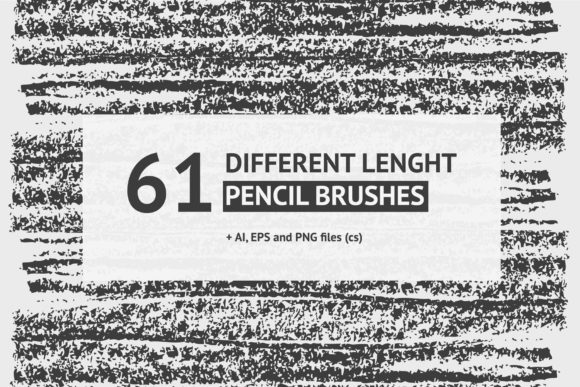
Digital art has long been criticized for appearing too "perfect" or synthetic. The smoothness of a standard bezier curve, while mathematically precise, rarely mimics the friction of a pencil lead dragging across textured paper. Artists spend hours applying grain filters or rasterizing layers to fake this effect, often compromising the editability of their work. The introduction of a comprehensive set of 61 different length hand drawn pencil brushes addresses this issue at its core. These brushes are not merely simulated; they are derived from actual hand-made strokes, capturing the nuance of pressure, speed, and angle that defines human creativity.
When we discuss the 61 Textured Vector Pencil Brushes, we are talking about a toolset designed to inject life into flat designs. Whether you are sketching a character concept, outlining a complex logo, or adding shading to a technical diagram, the ability to vary line weight and texture dynamically is crucial. These brushes allow the digital pen to behave more like a physical instrument, responding to the artist's touch rather than forcing the artist to conform to rigid digital constraints.
Understanding the Composition of the Brush Set
The value of this collection lies in its diversity and technical construction. The pack includes 9 distinct brush libraries, offering a wide array of stylistic options ranging from fine, sharp liners to broad, soft shading tools. Each library is curated to serve a specific purpose within the illustration process. For instance, some brushes are optimized for initial sketching, providing a loose and exploratory feel, while others are refined for final inking, delivering crisp yet textured outlines.
A critical feature of the 61 Textured Vector Pencil Brushes is their pressure sensitivity. In modern creative workflows, the tablet stylus is an extension of the hand. These brushes leverage that connection, allowing line thickness and opacity to fluctuate based on how hard the user presses. This dynamic range is essential for creating depth and dimension. A light touch might produce a faint, whisper-like stroke ideal for subtle contours, whereas increased pressure yields a bold, dark mark perfect for emphasizing shadows or focal points.
Technical Versatility and File Formats
One of the most practical aspects of this resource is its compatibility across different software environments. The package is delivered in multiple formats—AI, EPS, and PNG—ensuring that it fits seamlessly into various pipelines. For users of Adobe Illustrator, the AI and EPS files contain all 61 vector brushes ready for immediate deployment. This vector-based approach means that every stroke remains fully editable. You can resize, recolor, or reshape a line without any loss of quality, a significant advantage over raster-based alternatives that pixelate when scaled.
However, the utility of the 61 Textured Vector Pencil Brushes extends beyond vector-only applications. The inclusion of high-resolution PNG files makes these textures accessible for Photoshop and other raster-based programs. This cross-platform flexibility is vital for professionals who often switch between applications during a single project. An artist might sketch in Illustrator using the vector brushes for clean scalability and then import those elements into Photoshop to add complex color grading and atmospheric effects.
Installation and access are straightforward, designed to minimize setup time and maximize creative flow. To utilize the brush libraries in Illustrator, users simply navigate to the Brush menu, click the triangle icon in the top right corner, and select "Open Brush Library." From there, choosing the specific file from the pack loads the entire set into the workspace. Alternatively, for those who prefer custom configurations, the individual objects within the AI and EPS files can be used to create new brushes with personalized settings, offering an additional layer of customization for advanced users.
Real-World Applications and Beneficiaries
Who stands to benefit most from integrating the 61 Textured Vector Pencil Brushes into their toolkit? The answer spans a wide demographic of creative professionals. Graphic designers working on branding projects can use these brushes to create logos that feel handcrafted and unique, standing out in a sea of geometric minimalism. Illustrators specializing in children's books or editorial content can utilize the varied lengths and textures to bring characters and scenes to life with a storybook charm.
Furthermore, architects and product designers often require a method to present concepts that feels less like a computer rendering and more like a visionary sketch. These pencil brushes provide the perfect medium for conceptual drawings that need to communicate ideas quickly while retaining an artistic flair. Even educators and content creators can find value here, using the brushes to annotate diagrams or create engaging visual aids that hold the viewer's attention better than standard digital fonts and shapes.
Consider a scenario where a marketing agency is developing a campaign for an artisanal coffee brand. The goal is to evoke feelings of warmth, tradition, and human touch. Using standard vector tools might result in imagery that feels too corporate or cold. By employing the hand drawn pencil brushes from this set, the design team can create packaging illustrations and promotional materials that mimic the look of a sketch done in a café, perfectly aligning the visual identity with the brand's ethos.
Evaluating Suitability and Practical Expectations
While the 61 Textured Vector Pencil Brushes offer immense potential, it is important for users to have realistic expectations regarding their application. These tools are powerful, but they are not a magic wand that automatically creates masterpieces. They require a degree of skill and understanding of traditional drawing principles to be used effectively. The pressure sensitivity, for example, relies on proper tablet calibration and user technique. An artist accustomed to mouse-only input may need to invest time in learning how to leverage a stylus to unlock the full potential of these brushes.
Additionally, while the vector nature of the brushes ensures scalability, extremely complex textures can sometimes increase file size or processing load in very large documents. Users working on massive-scale prints or highly detailed compositions should monitor their system performance. However, for the vast majority of standard illustration and design tasks, the optimization of these brushes strikes an excellent balance between detail and efficiency.
It is also worth noting that the "hand-crafted" feel is subjective. What looks natural to one viewer might appear stylized to another. Therefore, evaluating the suitability of these brushes for a specific project involves testing them within the context of the overall design language. Do they complement the typography? Do they harmonize with the color palette? The 61 Textured Vector Pencil Brushes are versatile enough to adapt to many styles, but thoughtful integration is key to achieving a cohesive final product.
The Value of Hand-Made Digital Assets
In an era where AI-generated art and automated design tools are becoming increasingly prevalent, the value of assets that retain a human touch cannot be overstated. The 61 Textured Vector Pencil Brushes represent a commitment to preserving the artisanal quality of illustration within the digital realm. They remind us that technology should enhance human creativity, not replace the nuances that make art resonate emotionally.
By providing a bridge between the tactile experience of drawing and the infinite possibilities of digital editing, this collection empowers creators to push boundaries. It allows for rapid iteration—something impossible with traditional media—while maintaining the aesthetic integrity of hand-drawn work. Whether you are a seasoned professional looking to expand your textural repertoire or a hobbyist eager to elevate your digital sketches, these brushes offer a robust foundation for artistic expression.
Ultimately, the decision to incorporate such tools comes down to the desired outcome of the project. If the goal is to create something that feels alive, imperfect, and distinctly human, then the High-Quality Hand Drawn Pencil Brushes for Adobe Illustrator are an essential addition to your digital arsenal. They transform the canvas from a grid of pixels into a space where imagination can flow as freely as graphite on paper, ensuring that every line tells a story.