Elevating Digital Lettering Workflows with DevBrush 6.0 for Procreate 5
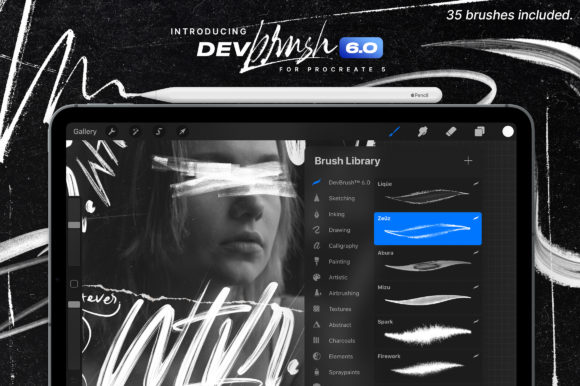
In the evolving landscape of digital creativity, the tools we choose often dictate the efficiency and quality of our output. For letterers, calligraphers, and type designers working within the iPad ecosystem, DevBrush 6.0 for Procreate 5 represents a significant upgrade in workflow capability. This is not merely a collection of assets; it is a specialized toolkit designed to bridge the gap between traditional hand-lettering techniques and modern digital execution. By integrating these 35 custom brushes into your daily routine, you can streamline the creation of breathtaking works while maintaining the organic feel that defines high-quality typography.
The transition from physical media to digital platforms requires more than just a stylus; it demands a set of tools that respond predictably to pressure, tilt, and speed. DevBrush 6.0 addresses this by offering a curated selection of brushes specifically engineered for the nuances of lettering and calligraphy. Whether you are a freelancer managing tight client deadlines, an educator demonstrating stroke mechanics, or a hobbyist refining your personal style, understanding how to deploy these resources effectively is key to maximizing their value.
Strategic Integration into Creative Projects
Implementing DevBrush 6.0 for Procreate 5 into your workflow begins long before the first stroke is drawn. It starts with preparation and compatibility checks. To ensure a seamless experience, your hardware setup must meet specific requirements: an Apple iPad 6th Generation or any model of the iPad Pro, paired with an Apple Pencil or a highly compatible stylus. The software foundation is equally critical; the brush set is optimized exclusively for Procreate 5 or higher. Attempting to use these assets in Photoshop or other desktop applications will result in incompatibility, as the brush engine relies on iOS-specific rendering protocols.
Once your environment is verified, the installation process sets the stage for organization. A disorganized library can hinder creativity, so treating the installation as a structural step is vital. Begin by extracting the downloaded .zip file on your computer or directly on your iPad. Locate the unzipped .brushset files and place them in your iCloud Drive. On your iPad, navigate to the iCloud location where the files reside. Tap the .brushset file, select the share button located in the right-hand corner, and choose "Copy to Procreate." This action imports the entire set at once. Afterward, scroll through your brush library to confirm the new set appears, perhaps renaming it or moving it to a dedicated "Lettering" folder for quick access during active projects.
Enhancing the Execution Phase
During the active creation phase, DevBrush 6.0 serves as the primary engine for generating form and texture. The set includes 35 distinct brushes, each tailored to different aspects of lettering and calligraphy. Unlike generic brush packs that offer a scattergun approach, this collection focuses on consistency and control. When drafting a logo or a hand-lettered quote, you can switch between thick downstrokes and delicate upstrokes without leaving the app or adjusting complex settings manually.
The true power of these brushes emerges when you experiment with the dynamic features of Procreate. Do not limit yourself to the default black ink on a white canvas. The workflow improves significantly when you engage with blending modes and color variations. For instance, using a multiply blend mode with a textured brush can simulate the look of ink soaking into paper, adding depth to your digital compositions. Furthermore, the interaction between the brush tool, the eraser, and the smudge tool allows for real-time refinement. You can soften harsh edges, create gradients within a single letter, or distress the edges of a wordmark to give it a vintage aesthetic—all within the same layer structure.
For type designers, the utility extends to sketching glyph structures. The responsiveness of DevBrush 6.0 to the Apple Pencil's tilt and pressure sensitivity means that varying the angle of your hand naturally alters the stroke width, mimicking the behavior of a broad-edge nib or a flexible brush pen. This reduces the need for post-processing vectorization adjustments, allowing you to finalize concepts faster. Marketers and social media managers can leverage this speed to produce custom typographic assets for campaigns, ensuring brand uniqueness that stock fonts cannot provide.
Optimizing Quality and Consistency
Maintaining high standards across multiple projects requires discipline and an understanding of your tools' limitations and strengths. One common pitfall in digital lettering is over-reliance on undo commands rather than mastering the physical motion. To counter this, use DevBrush 6.0 as a training aid. The brushes are designed to reward steady, confident movements. If your lines appear jagged or inconsistent, it often indicates a need to adjust your grip or the angle of the iPad rather than a fault in the software.
Efficiency also comes from creating reusable templates. Once you have identified the specific brushes within the 35-set collection that align with your personal style or a client's brand guidelines, save these configurations. You can create a "Master Canvas" in Procreate with your preferred color palettes, background textures, and the DevBrush set loaded. This preparation minimizes setup time for future tasks, whether you are designing a wedding invitation, a book cover, or an educational worksheet.
It is crucial to remember that these brushes are purpose-built. They do not function in Photoshop or other non-iOS applications. This specialization ensures that when you are working within Procreate, the performance is optimized for the iPad's processor and the Apple Pencil's latency rates. For professionals who work across multiple platforms, the workflow involves completing the initial creative heavy-lifting in Procreate using DevBrush 6.0, exporting the high-resolution PNG or PSD, and then moving to desktop software only for final layout or print preparation if absolutely necessary.
Long-Term Utility and Skill Development
Beyond immediate project completion, DevBrush 6.0 for Procreate 5 supports long-term skill acquisition. For educators and bloggers, the set provides a reliable standard for teaching digital calligraphy. Because the brushes behave predictably, students can focus on learning stroke order and composition rather than troubleshooting erratic tool behavior. Hobbyists can use the variety within the 35 brushes to explore different historical scripts, from modern calligraphy to traditional serif lettering, expanding their versatility without purchasing multiple separate packs.
Consistency in output is a hallmark of professional work. By sticking to a defined set of tools like DevBrush 6.0, you develop muscle memory specific to those digital instruments. Over time, this leads to faster execution times and a more distinctive personal style. The ability to tweak angles, colors, and blending modes means that while the tool remains constant, the output never has to feel repetitive. You can achieve a watercolor effect for one client and a sharp, geometric sans-serif look for another using the same underlying brush engine, simply by altering your technique and settings.
In conclusion, integrating DevBrush 6.0 into your digital arsenal is a strategic move for anyone serious about lettering on the iPad. It fits seamlessly into the planning, execution, and refinement stages of creative work. By respecting the hardware requirements, organizing your library efficiently, and experimenting with the full range of Procreate's features, you transform a simple brush set into a comprehensive solution for professional-grade typography. The result is a workflow that is not only faster and more organized but also capable of producing the breathtaking, high-quality works that stand out in today's crowded visual marketplace.