Unlock Spooky Creativity with the Procreate Palette - Halloween Colors
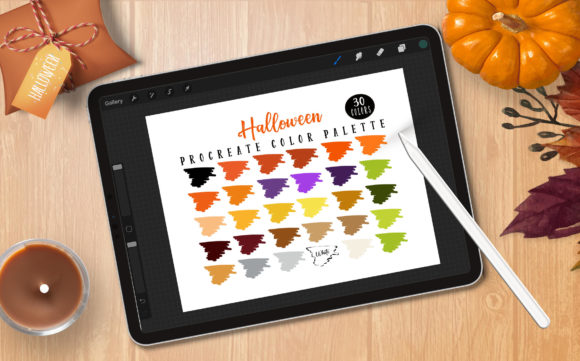
There is a specific kind of frustration that hits when you are in the middle of a digital illustration, the idea is flowing, but your color wheel feels flat. You spend twenty minutes mixing shades of orange and purple, only to realize they look muddy or too neon for the eerie atmosphere you are trying to build. This is exactly why I created the Procreate Palette - Halloween Colors. As a Procreate fanatic, I know that having a solid, pre-curated set of swatches before you begin your project helps your creative flow without thinking about the right color swatch. This palette is a great source for your Halloween projects, designed to eliminate guesswork and let you focus on the art.
However, diving into digital art tools comes with a learning curve, and there are some common misunderstandings about how these files work. The most critical detail to understand immediately is compatibility. This ONLY works with Procreate as it is a .swatches file. If you do not have Procreate, these files will NOT work elsewhere. I have seen many artists purchase digital assets expecting them to open in Photoshop, Illustrator, or even on an Android tablet, only to be disappointed. Before you download, ensure you meet the requirements: an iPad Pro or standard iPad with Procreate Version 5.0 or higher. Without this specific ecosystem, the file simply cannot be read.
Avoiding the Compatibility Trap
One of the most frequent mistakes creators make is assuming all digital color palettes are universal. They are not. A .swatches file is proprietary to the Procreate app. Trying to force this file into another program is a waste of time and can lead to unnecessary frustration. If you are a professional working across multiple platforms, you might need to manually recreate these hex codes in other software, but the direct import feature is exclusive to iPad users.
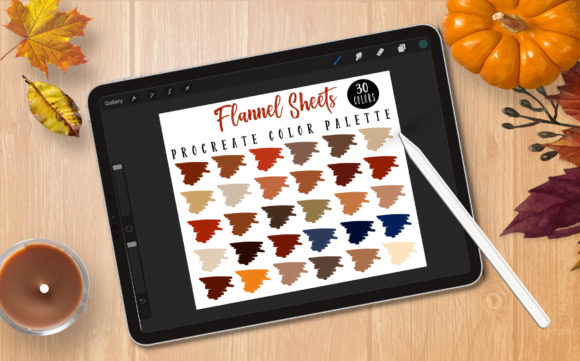
Furthermore, ensure your app is updated. Running an older version of Procreate (below 5.0) can cause import errors or prevent the palette from displaying correctly. Always check your App Store updates before purchasing or downloading specialized assets. This simple step ensures that the 30 carefully selected colors render exactly as intended, preserving the depth and mood of the design.
The Danger of Starting Without a Plan
Many beginners jump straight into drawing without defining their color story. This often results in illustrations that feel disjointed or visually chaotic. When you rely on the default color picker for every stroke, you risk creating inconsistent tones that clash rather than complement. The Procreate Palette - Halloween Colors solves this by providing a cohesive range of 30 hues specifically tuned for autumnal and spooky themes.
Using a dedicated palette does more than just save time; it elevates the quality of your work. It ensures that your shadows, mid-tones, and highlights share a common temperature. For example, using a standardized set of desaturated oranges and deep purples creates a unified vintage horror look, whereas picking random bright colors can make the piece feel like a cartoon. By locking in your palette first, you maintain visual consistency throughout the entire illustration, which is crucial for branding, social media content, or client work.
Maximizing Your Creative Workflow
Once you have imported the file, the next mistake to avoid is underutilizing the tool. Some artists treat palettes as a static reference rather than an active part of their workflow. Remember, you can use these swatches to create your own illustrations, color in line art, or develop other creative products. There are no limits to your creativity.
Try combining these colors with different brush textures. The interplay between a gritty charcoal brush and a deep blood-red swatch can create stunning texture that a flat fill cannot achieve. If you have an Apple Pencil or a pen that supports pressure sensitivity, you can leverage opacity variations within these colors to add depth. Do not just fill shapes; use the palette to build atmosphere through layering and blending modes.
Understanding Licensing and Usage
Before you start creating commercial products, it is vital to review the license details included with the download. Misunderstanding licensing terms can lead to serious issues for freelancers and small business owners. While this palette is designed to help you, you must respect the creator's rights regarding redistribution. Typically, you are free to use the colors in your finished artwork for sale, but you cannot resell the .swatches file itself as your own product. Always check the specific license note provided in the download folder to ensure you are compliant. This protects you legally and supports the community of creators who build these tools.
Installation and Setup
If you are new to Procreate, the installation process might seem daunting, but it is straightforward if you follow the included instructions. A common oversight is failing to locate the "Import" button within the Color Disc panel. Do not try to open the file from the iPad's main file manager expecting it to launch automatically; you must initiate the import from within the app.
Here is a quick overview of what you get and how to prepare:
- File Format: One Procreate color palette .swatches file containing 30 unique colors.
- Documentation: Detailed instructions included for uploading the palette if you are unsure of the steps.
- Hardware Needs: An iPad (Pro or standard) is required; this does not function on desktop computers or phones.
- Software Version: Ensure Procreate 5.0 or higher is installed.
Taking the time to set up your workspace correctly pays off immediately. Having these colors at your fingertips means you spend less time mixing and more time illustrating. Whether you are designing Halloween invitations, creating spooky character concepts, or painting seasonal landscapes, this toolkit streamlines the process.
Making the Right Choice for Your Projects
Ultimately, the goal of any digital asset is to enhance your efficiency and output quality. The Procreate Palette - Halloween Colors is not just a collection of random hues; it is a curated solution for a specific aesthetic challenge. By avoiding the pitfalls of incompatible software, unplanned color schemes, and licensing confusion, you position yourself for success.
Whether you are a hobbyist looking to decorate your digital planner or a marketer creating seasonal ad campaigns, the right tools make a difference. Embrace the constraints of the platform to unlock your potential, and let these 30 colors guide your next masterpiece. Happy creating, and may your layers always be organized!