Evaluating Hand Drawn Leaves Procreate Stamps for Digital Design
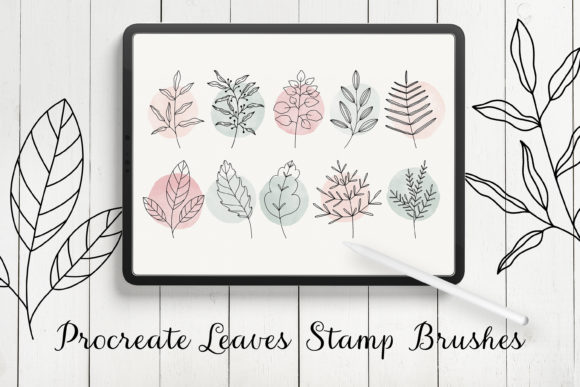
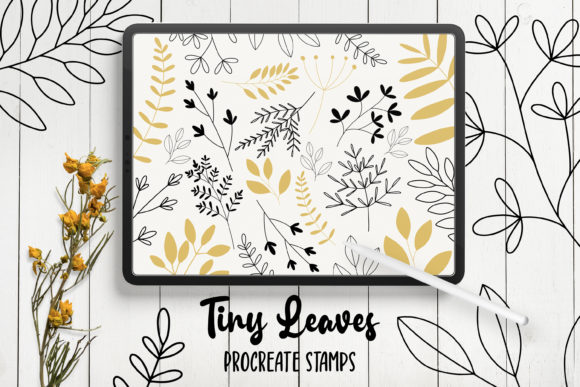
Digital illustration has evolved to include a vast array of specialized tools designed to streamline the creative process. Among these tools are stamp brushes, which allow artists to insert pre-drawn elements into their compositions with a single tap. The Hand Drawn Leaves Procreate Stamps represent a specific category of these assets, tailored for users working within the Procreate ecosystem on iPad. This collection features twenty-four distinct leaf shapes and greenery contours, all rendered in a doodle style to mimic organic, hand-sketched aesthetics. For designers evaluating whether this asset pack aligns with their workflow, it is essential to understand not only what the product offers but also the specific technical constraints and ideal use cases associated with it.
Understanding the Asset and Technical Requirements
The core of this product is a set of twenty-four digitally hand-drawn leaf stamps. Unlike standard texture brushes that create continuous strokes, stamp brushes place a complete image or shape onto the canvas each time the screen is touched. These particular stamps focus on greenery, offering various leaf silhouettes and contour elements that can be layered to create complex botanical arrangements. The artistic direction is explicitly "doodle style," suggesting a casual, imperfect, and charming line quality rather than hyper-realistic botanical accuracy.
However, before considering the artistic merits, one must address the strict technical prerequisites. These brushes are engineered exclusively for Procreate 5X on iPad. This specificity is crucial for potential users to note. The file format provided is a `.brushset`, which is native to Procreate and cannot be imported into other software without conversion tools that often alter brush behavior. Furthermore, the design of these stamps assumes the use of an Apple Pencil. While Procreate supports touch input, stamp brushes often rely on pressure sensitivity or tilt settings configured specifically for the Apple Pencil to function as intended regarding size variation or opacity.
It is equally important to clarify what this product is not. These brushes are not suitable for Photoshop or Illustrator. Users whose primary workflow resides in Adobe Creative Cloud will find these files incompatible. Attempting to use them outside the Procreate environment would require recreating the elements from scratch or finding alternative vector or raster packs designed for those platforms. This limitation narrows the audience significantly to iPad-based illustrators.
Practical Applications and Creative Benefits
For those who meet the hardware and software requirements, the Hand Drawn Leaves Procreate Stamps offer several practical advantages. The primary benefit is efficiency. Creating detailed botanical illustrations from scratch can be time-consuming, requiring careful attention to vein structures, shading, and composition. Stamp brushes bypass the initial sketching phase, allowing the artist to focus on arrangement and color theory. This makes them particularly valuable for projects with tight deadlines or for designers who need to produce high volumes of content.
The versatility of these stamps extends across various design verticals. They are well-suited for creating stickers, where the doodle aesthetic adds a personal, handmade touch that appeals to consumers. In the realm of invitations and greeting cards, these leaf elements can serve as decorative borders, frames, or background textures. Because the set includes contours as well as solid shapes, users can layer them to create depth, simulating a lush garden feel without the complexity of painting every individual leaf.
Branding and logo design also present strong use cases. A small business focusing on organic products, floristry, or eco-friendly goods might utilize these stamps to construct a unique logo mark. The hand-drawn nature of the strokes conveys authenticity and approachability, traits often desired in modern branding. Additionally, because the brushes are digital, the color palette is entirely customizable. Unlike physical stamps, users can change the hue, saturation, and brightness of the leaves instantly to match any brand guideline.
Considerations and Tradeoffs
While the convenience of stamp brushes is evident, there are tradeoffs that designers should evaluate. The most significant consideration is the potential for repetitiveness. Since the set contains a fixed number of twenty-four variations, overusing them in a single composition can result in a pattern that looks artificial or generic. Observant viewers may notice the same leaf shape appearing multiple times if the artist does not take care to rotate, scale, or modify the stamps sufficiently. To maintain a high-quality appearance, users must treat these stamps as building blocks rather than final solutions, often combining them with hand-painted elements or adjusting their properties.
Another factor is the stylistic limitation. The "doodle style" is a specific aesthetic choice. If a project requires photorealism, sharp geometric vectors, or a highly polished corporate look, these brushes may not be the right fit. The organic, slightly irregular lines are part of their charm but can clash with more rigid design languages. Users seeking precision engineering or architectural botanical illustrations might find the loose nature of these stamps inappropriate for their needs.
Furthermore, the dependency on the iPad ecosystem creates a barrier to collaboration. If a design team works across different platforms—for instance, one member uses an iPad while another finalizes layouts in Photoshop on a desktop—the inability to share the native brush files can disrupt the workflow. In such scenarios, it may be more prudent to seek assets available in universal formats like PNG sequences or vector SVGs, even if it means sacrificing the seamless integration Procreate offers.
Decision-Making Insights for Buyers
When deciding whether to acquire the Hand Drawn Leaves Procreate Stamps, creators should assess their current toolkit and project goals. This product is a strong fit if you already own an iPad with Procreate 5X and an Apple Pencil, and if your work frequently involves floral motifs, stationery design, or social media graphics that benefit from a whimsical touch. It is an excellent investment for those looking to speed up their workflow without compromising the hand-crafted feel of their art.
Conversely, alternatives should be considered if you operate primarily on desktop computers, rely on Adobe Illustrator for scalable vector graphics, or require a broader library of botanical elements to avoid repetition in large-scale murals or extensive pattern designs. In these cases, purchasing a comprehensive vector pack or a cross-platform texture library might provide better long-term value.
Ultimately, the value of this brush set lies in its specialization. It delivers a focused solution for a specific platform and style. By understanding the compatibility constraints and acknowledging the stylistic boundaries, designers can make an informed decision on whether these twenty-four hand-drawn leaves will enhance their creative repertoire or if their needs are better served by a more versatile, albeit less integrated, solution.