Evaluating the Halloween Stamp Set for Procreate: Features and Use Cases
For digital artists and hobbyists looking to infuse their work with seasonal flair, the Halloween Stamp Set for Procreate offers a specialized collection of assets designed to streamline the creative process. This resource is not merely a single brush file but a comprehensive toolkit intended to facilitate the creation of spooky-cute illustrations, patterns, and layouts. Whether you are an experienced iPad artist or someone exploring digital design for the first time, understanding the scope, compatibility, and practical applications of this set is essential before integrating it into your workflow.
What Is Included in the Collection?
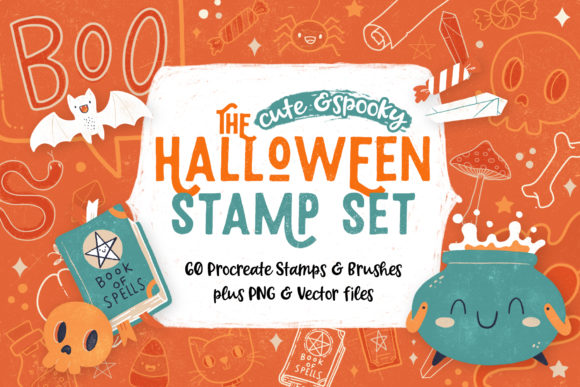
The core of this product is a dedicated Procreate stamp brush set containing 60 elements. Specifically, this includes 56 individual stamps and 4 distinct brushes. These tools are engineered to allow users to "tap to stamp" directly onto their canvas, significantly reducing the time required to draw repetitive motifs like ghosts, pumpkins, bats, and other Halloween critters from scratch. The aesthetic is generally described as "spooky cute," making it suitable for projects that require a whimsical rather than terrifying tone.
However, the value of this package extends beyond the proprietary Procreate format. Recognizing that not all creators use iPads or the Procreate application, the developers have included extensive alternative file formats. The set comprises:
- 59 PNG elements: These files feature transparent backgrounds, allowing for seamless layering in most photo editing software without unwanted white boxes around the images.
- 59 JPG elements: Provided with white backgrounds, these are useful for specific printing requirements or software that handles transparency less effectively.
- Vector files (AI and EPS): Compatible with Adobe Illustrator CC, these files allow for infinite scalability without loss of quality, catering to professional graphic designers who need to resize elements for large-format prints.
Practical Applications and Workflow Benefits
The primary benefit of utilizing a Halloween Stamp Set for Procreate lies in efficiency. For content creators facing tight deadlines, such as those producing social media content throughout October or designing holiday greeting cards, the ability to instantly place high-quality illustrations can be a significant time-saver. Instead of dedicating hours to sketching and inking individual elements, users can focus on composition, coloring, and layout.
Beyond digital illustration, these assets are highly versatile for mixed-media and planning communities. Bullet Journal enthusiasts often seek ways to decorate their planners without needing advanced drawing skills. By importing the PNG files or using the stamps directly in Procreate to create printable sheets, users can generate custom stickers to "pimp up" their photos or organize their monthly spreads. Similarly, scrapbookers can utilize these elements to create easy layouts, mixing and match spooky critters to tell a story within their physical or digital albums.
The inclusion of vector files adds a layer of professional utility. While the raster-based stamps in Procreate are resolution-dependent, the AI and EPS files ensure that the artwork remains crisp whether it is used for a small web icon or a large poster. This dual approach makes the set viable for both casual hobbyists and professional graphic designers who may need to deliver files in specific formats to clients.
Compatibility and Technical Considerations
When evaluating this tool, it is crucial to understand the technical limitations regarding software compatibility. The brush set component (.brushset) is exclusive to Procreate on the iPad. It does not function in Photoshop, Clip Studio Paint, or desktop versions of illustration software. Users attempting to install these brushes on non-iPad devices will find them unusable.
However, this limitation is mitigated by the inclusion of the standalone image and vector files. If you do not own an iPad or prefer working on a desktop, the PNG, JPG, and Vector files serve as effective alternatives. You can import these into virtually any graphic design software, including free options like GIMP or Canva, as well as professional suites like Adobe Creative Cloud. Therefore, the purchase remains valuable even for non-Procreate users, provided they are comfortable working with imported image assets rather than dynamic brush tools.
Ideal Use Cases vs. Alternatives
This stamp set is a strong fit for several specific scenarios. It is ideal for iPad artists who want to quickly populate a background with pattern elements or add decorative borders to their artwork. It is also highly recommended for small business owners creating Halloween-themed marketing materials who lack the time to commission custom illustrations. Furthermore, teachers or parents looking to create engaging, cute Halloween activities for children will find the "spooky cute" style appropriate and ready to use.
Conversely, there are situations where alternatives may be worth considering. If your artistic goal is to create hyper-realistic horror art or gritty, dark textures, the "cute" aesthetic of this set may not align with your vision. In such cases, seeking out texture brushes or more realistic asset packs would be more beneficial. Additionally, if you require fully customizable characters that you can pose and animate in 3D space, a 2D stamp set will not meet those needs. Artists who prioritize hand-drawn uniqueness above all else might also find that relying on stamps limits their personal stylistic expression, though these tools can still serve as excellent underlays or starting points for further modification.
Making the Decision
Ultimately, deciding whether to incorporate the Halloween Stamp Set for Procreate into your library depends on your current workflow and project goals. If you are an iPad user looking to enhance your productivity during the Halloween season while maintaining a whimsical aesthetic, this set offers a robust solution. The added value of the included vector and pixel files ensures that the investment is not wasted if you ever switch platforms or need to collaborate with designers using different software.
For those without Procreate, the decision rests on the utility of the PNG and Vector files alone. Given that these formats are industry standards compatible with most editing software, the set remains a practical resource for general graphic design tasks. By offering a blend of platform-specific tools and universal file types, this collection provides a flexible foundation for creating amazing and cute illustrations, patterns, and layouts, regardless of the device you use.