Food Illustration Create Procreate Brush Guide
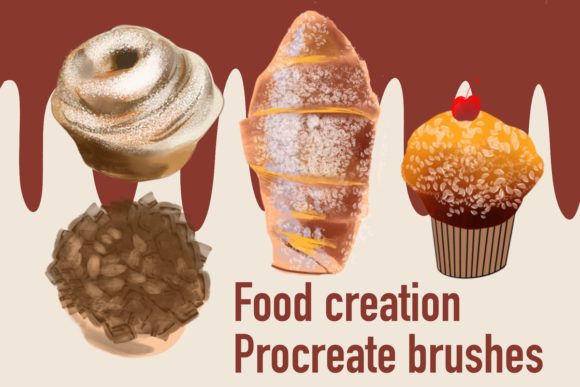
Digital art has revolutionized how we visualize cuisine, turning simple ingredients into mouth-watering masterpieces with just a few swipes. At the heart of this creative shift is the Food Illustration Create Procreate Brush set, a specialized tool designed to streamline the artistic process for anyone working on an iPad. Unlike generic painting tools, this collection focuses specifically on the textures, shapes, and vibrant colors associated with food, allowing artists to bypass tedious detailing and focus on composition and storytelling.
It is crucial to understand the technical boundaries of this tool before diving in. This brush set operates exclusively within the Procreate app on iPad devices. It does not function in Adobe Photoshop, Clip Studio Paint, or any desktop-based software. When you purchase or download this resource, you receive a .brushset file. This single file contains the entire library, ready to be imported instantly. Once installed, these brushes act primarily as stamps, meaning they deposit pre-designed shapes onto your canvas rather than creating continuous strokes like a traditional pencil. This distinction is vital for understanding how to integrate them into your workflow effectively.
Why Speed and Consistency Matter in Digital Food Art
The primary value proposition of using stamp-type brushes for food illustration is efficiency. Drawing a perfect strawberry, a realistic croissant, or a steaming cup of coffee from scratch requires significant skill and time. For professionals working under tight deadlines, this can be a bottleneck. The Food Illustration Create Procreate Brush set addresses this by providing high-quality, instant design elements. Instead of spending twenty minutes shading a lemon slice, an artist can place a base stamp and spend two minutes adjusting the color to match their lighting scheme. This shift allows creators to produce more work in less time without sacrificing visual appeal.
However, the definition of "value" changes depending on who is holding the Apple Pencil. What serves as a time-saver for a veteran illustrator might serve as a learning scaffold for a novice. Understanding these different perspectives helps potential users decide if this specific toolset aligns with their current goals.
Perspectives for Beginners and Hobbyists
For those just starting their digital art journey, the blank canvas can be intimidating. Beginners often struggle with proportions and texture rendering. A set of food-specific stamp brushes offers a safe environment to experiment with composition. By using pre-made elements, a hobbyist can focus on arranging a scene—learning about balance, color harmony, and negative space—without getting frustrated by the inability to draw a perfect circle or a realistic bun.
- Learning Value: Users can study how the brushes are constructed by examining the layers and textures they create.
- Confidence Building: Creating a finished piece quickly provides a sense of accomplishment that encourages further practice.
- Low Barrier to Entry: Since the brushes handle the complex texturing, the user only needs to master basic placement and color adjustment.
A beginner might use these brushes to create a digital food journal, documenting meals with charming, consistent illustrations that look professional despite their developing sketching skills.
The Professional and Freelancer Workflow
Experienced illustrators, graphic designers, and freelancers often face the pressure of commercial viability. Clients in the restaurant industry, food packaging sector, or editorial publishing need assets that are both unique and delivered rapidly. For this audience, the Food Illustration Create Procreate Brush set is a strategic asset rather than a crutch.
Professionals evaluate these tools based on flexibility and commercial value. Can the stamp be recolored easily? Does it blend well with hand-drawn elements? The answer is generally yes, provided the artist knows how to manipulate Procreate's blending modes. A freelancer creating a menu for a local café might use the stamp brushes for repetitive items like garnishes or side dishes, reserving their custom drawing skills for the hero dish that requires a unique touch. This hybrid approach maximizes billable hours while maintaining a high standard of quality.
Entrepreneurs and Content Creators
In the age of social media, visual content is currency. Bloggers, marketers, and small business owners in the food niche constantly need fresh imagery for Instagram posts, Pinterest pins, and website headers. Hiring an illustrator for every single post is often cost-prohibitive. This is where the utility of instant design brushes shines.
An entrepreneur running a meal prep service can use these brushes to create cohesive branding materials. Because the brushes come from a single set, the stylistic consistency is automatic. Every illustrated ingredient shares the same line weight, texture, and vibe, which strengthens brand recognition. For a marketer, the priority is speed and presentation. They need to convey the freshness and appeal of a product instantly. Using a stamp brush to populate a promotional graphic with illustrated vegetables allows them to iterate designs quickly, testing different layouts until the conversion rate improves.
Educators and Publishers
Educators creating materials for culinary schools, nutrition guides, or children's cookbooks also find immense value in standardized illustration sets. Consistency is key in educational materials; if a carrot looks different on page three than it does on page ten, it can distract the learner. A unified brush set ensures that all visual aids maintain a coherent style throughout a textbook or a series of lesson plans.
Publishers looking to reduce production costs might utilize these assets for internal documents or draft layouts before commissioning final custom artwork. The reliability of having a known quantity—a brush that works the same way every time—streamlines the editorial process.
Practical Considerations and Limitations
While the benefits are clear, it is honest to address the limitations to ensure the right fit for your needs. As mentioned, the exclusivity to Procreate is a hard constraint. If your workflow relies heavily on Photoshop for final retouching or vectorization, these brushes will not transfer directly. You would need to create your artwork in Procreate, export it as a PNG or PSD, and then move it to other software. This extra step might negate the time saved for some users.
Furthermore, because most brushes in this set are stamp types, they are best suited for adding details, patterns, or specific objects. They are not ideal for creating organic, flowing backgrounds or complex character animations where stroke dynamics are essential. Users seeking a tool for freehand sketching from scratch may find stamp brushes restrictive if they do not know how to combine them with standard drawing tools.
Making the Right Choice for Your Goals
Deciding whether to incorporate the Food Illustration Create Procreate Brush set into your toolkit comes down to identifying your primary bottleneck.
- If your bottleneck is time: And you work primarily on an iPad, this set offers an immediate solution to speed up your output.
- If your bottleneck is skill: And you struggle with rendering specific food textures, these brushes provide a high-quality foundation to build upon.
- If your bottleneck is consistency: And you need to produce large volumes of branded content, the uniform style of the stamp set is invaluable.
Conversely, if you are a purist who enjoys the meditative process of drawing every leaf and crumb by hand, or if your studio ecosystem is entirely desktop-based, this tool may not serve your immediate needs. The true power of this resource lies in its ability to augment human creativity, not replace it. It handles the repetitive heavy lifting, freeing the artist to focus on the narrative, the mood, and the unique flair that only a human creator can provide.
Ultimately, digital tools are extensions of our intent. Whether you are a student learning the ropes, a business owner scaling your visual identity, or a seasoned pro looking to shave hours off a project, the right brush set can transform a daunting task into an enjoyable creative session. By understanding exactly what the Food Illustration Create Procreate Brush offers—and what it requires—you can make an informed decision that enhances your artistic journey.