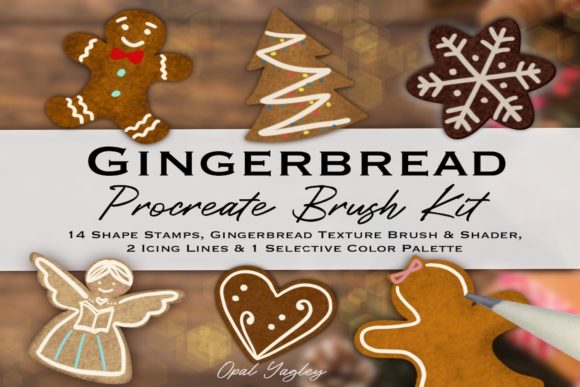
Procreate Gingerbread Brush Kit for Holiday Art
The smell of spiced cookies and the warmth of a winter kitchen often inspire some of the most cherished digital illustrations of the year. For artists working on iPads, capturing that specific cozy aesthetic requires more than just standard round brushes. This is where a specialized toolset like the Procreate Gingerbread Brush Kit becomes invaluable. It is not merely a collection of stamps; it is a curated system designed to replicate the tactile feel of baked goods, flowing icing, and soft cookie textures directly on your screen. Whether you are designing a holiday greeting card, creating social media content for a bakery, or simply enjoying a seasonal hobby, understanding how these specific tools function can transform your workflow from tedious to delightful.
At its core, this kit addresses a common challenge in digital art: achieving organic texture without spending hours painting every crumb by hand. The package includes 14 Gingerbread Cookie Shape Stamps, which serve as the foundation for your characters and treats. These are not static images but dynamic stamps that integrate with the software's engine. Beyond the shapes, the kit provides a dedicated Gingerbread Texture Brush and a Gingerbread Shader Brush. These tools allow you to build up the surface of your cookies, adding depth, shadow, and that slightly rough, sugary finish that makes digital art feel tangible. Furthermore, the inclusion of two distinct Icing Line Brushes—one with a sharp edge for crisp details and another with a blurred edge for soft, melted looks—gives you complete control over the decoration process.
Tailored Value for Different Creators
The utility of this brush set shifts significantly depending on who is holding the Apple Pencil. A beginner approaching digital art for the first time has vastly different needs than a seasoned graphic designer managing a commercial campaign. Recognizing these differences helps in evaluating whether this tool is the right fit for your current projects.
For beginners and hobbyists, the primary appeal lies in ease of use and immediate gratification. Learning to draw complex cookie shapes from scratch can be discouraging when you are still mastering pressure sensitivity and layer management. The 14 included shape stamps remove the barrier of entry regarding form. You can place a perfect gingerbread man or star instantly, allowing you to focus entirely on coloring and decorating. The included Gingerbread Color Guideline and the 30 Selective Color Swatches act as an educational scaffold. Instead of guessing which browns look appetizing or which pastel blues mimic royal icing, users have a pre-tested palette. This accelerates the learning curve, letting new artists produce polished work quickly while they study how the texture brushes interact with the base layers.
In contrast, professional illustrators and freelancers often evaluate tools based on speed, flexibility, and commercial viability. For a freelancer rushing to meet a December deadline for a client's marketing materials, time is money. The ability to stamp a base shape and immediately apply a realistic texture shader can cut illustration time in half. Professionals also care deeply about the nuance of the icing brushes. The distinction between the sharp and blurred edge options allows for high-fidelity detailing that mimics real-world physics, essential for high-resolution print work or upscale branding. These users are less interested in the "fun" factor and more focused on whether the brushes offer enough customization to create unique assets that don't look like generic clip art.
Practical Applications Across Industries
The versatility of the Procreate Gingerbread Brush Kit extends beyond simple holiday cards. Small business owners, particularly those in the food and beverage sector, can leverage these tools for cost-effective content creation. Imagine a local café wanting to announce their seasonal menu on Instagram. Hiring a photographer for a staged shoot can be expensive and time-consuming. Instead, the owner or a hired social media manager can use the iPad Pro and Apple Pencil to create charming, hand-drawn graphics that stand out in a feed saturated with stock photography. The specific texture and shader brushes ensure the digital cookies look inviting rather than flat, maintaining brand quality without the overhead of a full production team.
Educators and teachers also find unique value in this type of specialized asset. When teaching digital art classes during the winter term, having a cohesive set of tools allows instructors to focus on technique rather than troubleshooting broken shapes or inconsistent colors. The kit serves as a reliable standard for the whole class. Students can experiment with the icing lines to learn about stroke weight and pressure control, using the gingerbread shapes as a consistent canvas. This levels the playing field, ensuring that assessment is based on artistic application rather than the ability to draw a symmetrical cookie from memory.
Even marketers and bloggers who are not traditional artists can benefit. The visual language of holidays is powerful for engagement. Using these brushes to create custom headers, email newsletter graphics, or blog post illustrations adds a personal touch that resonates with audiences. The 30-color palette ensures that the visuals remain on-brand and aesthetically pleasing, avoiding the clashing colors that often plague amateur designs. The key here is the balance between professional presentation and approachable warmth that these specific textures provide.
Technical Considerations and Compatibility
Before integrating this kit into your workflow, it is crucial to understand the technical ecosystem required. This toolset is built exclusively for the Procreate app on iPad devices, including the iPad Pro. It relies heavily on the specific rendering engine of Procreate and the pressure sensitivity data provided by the Apple Pencil. Consequently, this brush kit does not work in Adobe Photoshop, Illustrator, or other desktop-based applications. Attempting to import these files elsewhere will result in errors or non-functional assets. This limitation is important for professionals who operate in a multi-software environment; if your final deliverable must be a layered PSD file for a print shop, you will need to complete the artwork in Procreate first and then export it appropriately.
The reliance on the Apple Pencil is not just a compatibility issue but a functional necessity. The Gingerbread Shader Brush and the icing tools are calibrated to respond to tilt and pressure. Pressing harder might deposit more "dough" texture, while tilting the pencil could simulate spreading icing with the side of a spatula. Without this hardware interaction, the brushes lose their dynamic range, becoming static stamps rather than expressive tools. Users with older styluses or those attempting to use finger input will find the experience significantly limited.
Making the Right Choice for Your Goals
Deciding whether to adopt the Procreate Gingerbread Brush Kit ultimately comes down to aligning the tool's strengths with your specific objectives. If your goal is rapid prototyping of holiday concepts, the shape stamps and color swatches offer unmatched efficiency. If you are an educator looking for a structured way to teach texture and layering, the guideline and shader combination provides a clear curriculum path. However, if you require vector scalability or need to work strictly within a desktop Adobe environment, this kit will not meet your needs.
Quality and long-term usefulness are also factors. Unlike trend-heavy filters that fade after a season, texture and shading techniques are fundamental skills. While the theme is seasonal, the mechanics of using a shader brush to create volume or an icing brush to manage line variance are transferable skills. The investment in this kit is not just for one December; it is an investment in understanding how to simulate organic materials digitally. Whether you are a small business owner trying to save on marketing costs or a professional illustrator refining your holiday portfolio, the right tools bridge the gap between imagination and execution. By matching your workflow requirements with the specific capabilities of these 14 stamps, texture brushes, and curated colors, you ensure that your creative process remains joyful and productive throughout the festive season.