Unlocking Digital Romance: A Complete Guide to Using 3D Heart Stamps in Procreate
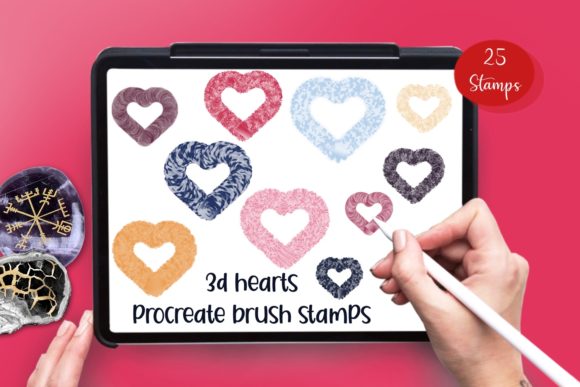
In the rapidly evolving world of digital art, creators are constantly seeking tools that bridge the gap between technical efficiency and emotional expression. Among the most popular symbols in the visual lexicon is the heart. Whether used for Valentine's Day promotions, wedding invitation designs, or simply adding a touch of warmth to a daily sketch, the heart remains a universal language of love and appreciation. However, drawing perfect, dimensional hearts repeatedly can be time-consuming. This is where specialized digital assets, such as the 3D Hearts 25 Procreate Brush Stamps, transform the workflow for artists of all skill levels.
This article explores the purpose, significance, and practical application of using stamp brushes in digital illustration. We will delve into why this specific set of 25 unique 3D heart stamps is a valuable addition to your creative toolkit, how it fits into modern design workflows, and clarify common misconceptions about compatibility and hardware requirements.
Understanding Digital Stamp Brushes
To fully appreciate the value of a brush stamp set, one must first understand what a "stamp" is in the context of digital painting. Unlike a standard brush that lays down color continuously as you drag your stylus across the screen, a stamp brush deposits a pre-designed image with a single tap. Think of it as a digital rubber stamp. When you tap the canvas, the entire shape—complete with its shading, highlights, and texture—appears instantly.
The 3D Hearts 25 Procreate Brush Stamps set leverages this technology to provide instant dimensionality. In traditional media, creating a 3D effect requires careful layering of shadows and highlights to simulate depth. In digital media, this work is done beforehand by the brush creator. When you use these stamps, you are essentially placing a miniature, fully rendered illustration onto your canvas. This allows artists to focus on composition and storytelling rather than getting bogged down in repetitive rendering tasks.
The Significance of Dimensionality in Modern Design
We live in an era where flat design often dominates user interfaces and minimalism. However, there is a resurging trend toward "neumorphism" and 3D elements that feel tactile and tangible. A flat red heart is recognizable, but a 3D heart with glossy highlights and soft shadows evokes a stronger emotional response. It feels real enough to touch.
For businesses and content creators, this distinction is crucial. Social media posts, digital stickers, and printable products that utilize 3D elements tend to stand out more in crowded feeds. The psychological impact of a well-rendered 3D object suggests quality and care, which can enhance brand perception. By utilizing a set of 25 varied 3D hearts, a designer can create dynamic patterns, engaging backgrounds, or focal points that capture attention immediately.
Practical Applications for Creators
The versatility of the 3D Hearts 25 Procreate Brush Stamps extends far beyond simple decoration. Because the set includes 25 total stamps, users have a wide variety of angles, sizes, and styles to work with. Here are several ways these tools fit into modern creative activities:
- Digital Planner Decoration: Users of digital planners on iPads can quickly annotate their journals with expressive hearts to mark special dates, anniversaries, or moments of gratitude without breaking their writing flow.
- Greeting Card Design: Freelance designers can assemble custom Valentine's Day or anniversary cards in minutes. The 3D effect adds a premium feel to digital downloads or printed cards.
- Social Media Content: Influencers and marketers can overlay these stamps on photos or videos to create engaging stories and reels that resonate with themes of love and community.
- Pattern Creation: By repeating different stamps from the set, textile designers or surface pattern artists can generate seamless backgrounds for fabrics, wrapping paper, or website backgrounds.
The educational value here lies in understanding efficiency. Professional artists know that time is money. Spending twenty minutes drawing one perfect heart might be a good exercise, but spending twenty seconds placing a perfect 3D heart allows more time for the overall composition. This shift in workflow is essential for meeting tight deadlines in the gig economy.
Clarifying Compatibility and Hardware Myths
One of the most significant barriers to entry for new digital artists is the confusion surrounding hardware requirements. There is a common misunderstanding that to use advanced Procreate brushes, specifically those with 3D effects or pressure sensitivity, one must own the most expensive iPad model (iPad Pro) and the Apple Pencil. This is not true, and it is vital to clarify this assumption.
The 3D Hearts 25 Procreate Brush Stamps are explicitly designed to be accessible. Because these brushes function as stamps, they do not rely on pressure sensitivity to create their form. The 3D look is baked into the stamp image itself. Therefore:
- You do not need an iPad Pro.
- You do not need an Apple Pencil or any pressure-sensitive stylus.
- You can use a basic stylus, a capacitive touch pen, or even your finger to tap the screen and deploy the stamp.
This inclusivity is a game-changer for students, hobbyists, and educators who may be working with older iPad models or budget-friendly tablets. It democratizes the ability to create high-quality, professional-looking art. As long as you have the Procreate app installed on your iPad, you can unlock the full potential of this brush set.
Important Technical Limitations
While accessibility is high, it is equally important to address platform limitations to prevent frustration. This product is NOT compatible with Photoshop. Procreate uses a proprietary file format (.brushset) that is native to the iPadOS ecosystem. Photoshop utilizes different file structures (such as .abr). Attempting to import these files into desktop software will result in errors. Understanding the ecosystem of your tools is a fundamental part of digital literacy; knowing that Procreate assets stay within the Apple iPad environment helps users organize their libraries effectively.
Getting Started: From Download to Masterpiece
Integrating new tools into your routine should be a seamless process. Upon purchasing the 3D Hearts 25 Procreate Brush Stamps, you will receive a single .zip file. Inside this archive is one brushset file containing all 25 stamps. The installation process is straightforward:
- Download the zip file to your iPad (usually via the Files app).
- Tap the file to unzip it if necessary, though Procreate can often read the contents directly depending on your browser settings.
- Open the Procreate app.
- Navigate to the Brush Library and tap "Import" at the top of the list.
- Select the brushset file. All 25 hearts will instantly appear in your library, ready to use.
Once installed, the creative possibilities are endless. You can change the color of the stamps by adjusting the hue in Procreate's color picker, allowing a single red heart stamp to become pink, gold, or blue instantly. You can also layer them, rotate them, and adjust their opacity to create complex, dreamy compositions.
Conclusion
The 3D Hearts 25 Procreate Brush Stamps represent more than just a collection of images; they are a tool for empowerment in the digital age. They allow beginners to create professional-grade artwork without needing years of rendering practice, and they enable professionals to speed up their workflow without sacrificing quality. By understanding the mechanics of stamp brushes, recognizing the importance of 3D aesthetics in modern media, and clearing up hardware myths, artists can confidently incorporate these tools into their projects.
Whether you are designing a wedding suite, decorating a digital journal, or simply exploring the joys of digital painting, these 25 unique stamps offer a versatile, accessible, and emotionally resonant way to express creativity. Remember, the best tool is the one that helps you bring your vision to life efficiently, and in the realm of iPad art, this brushset does exactly that.