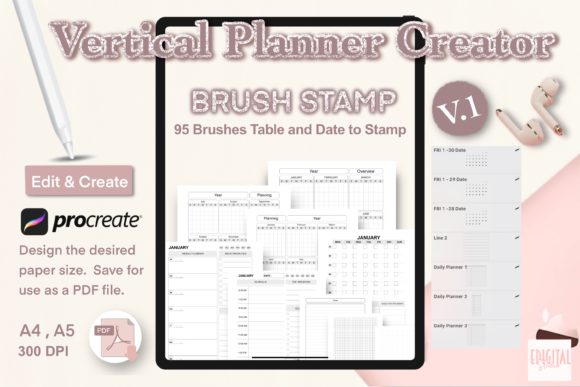
Vertical Planner Creator Brush Stamp V.1
The transition from a blank digital canvas to a fully functional, aesthetically pleasing planner often hinges on the tools you choose to build it. For Procreate users looking to streamline their workflow without sacrificing customizability, the Vertical Planner Creator Brush Stamp V.1 offers a robust foundation. This tool is not merely a collection of pre-made images; it is a modular system designed to help creators, entrepreneurs, and organizers construct bespoke planning layouts that fit their specific cognitive and operational needs. Whether you are designing a yearly overview for a small business or a daily tracker for personal habits, this brush set provides the structural integrity required to build professional-grade planners directly on your iPad.
Reimagining Digital Planning Architecture
Traditional paper planners force you into a rigid grid. You must write within the lines provided, regardless of whether that space suits your thought process. The Vertical Planner Creator Brush Stamp V.1 flips this dynamic by giving you the power to define the architecture of your organization. Because these are brush stamps within Procreate, they behave differently than static PNG imports. They allow for rapid iteration. You can test a layout, realize the spacing is too tight for your handwriting style, and immediately adjust the scale or color before committing to the final design.
The core value of this tool lies in its versatility. It includes essential elements for building comprehensive planning systems: headers for yearly goals, structured blocks for weekly spreads, detailed sections for daily logs, and flexible areas for to-do lists and notes. By utilizing these stamps, you eliminate the tedious task of drawing straight lines and perfect boxes manually, allowing you to focus entirely on the logic and flow of your planner. The result is a clean, organized interface that encourages consistent use rather than becoming another abandoned app on your home screen.
Tailored Applications for Diverse Professionals
Different professions require different types of organization. A one-size-fits-all approach rarely works for long-term productivity. The beauty of building your own planner using these brushes is the ability to tailor the format to your specific industry demands.
- Entrepreneurs and Small Business Owners: Use the vertical layout to create high-level quarterly roadmaps alongside granular daily task lists. The ability to change colors means you can color-code projects by client or revenue stream, creating a visual dashboard of your business health at a glance.
- Educators and Content Creators: Lesson planning and content calendars thrive on vertical continuity. You can stack weekly objectives above daily execution steps, ensuring that every small task ties back to a larger curriculum goal or publishing schedule.
- Freelancers and Designers: Track billable hours, project milestones, and creative brainstorming sessions in a single document. The note sections included in the stamp set are perfect for sketching rough ideas next to scheduled deadlines.
- Hobbyists and Life Organizers: From meal planning to fitness tracking, the modular nature of the brushes allows you to create specialized pages that generic apps simply do not offer.
By adapting the Vertical Planner Creator Brush Stamp V.1 to these specific contexts, you move beyond simple scheduling into strategic management of your time and resources.
The Power of Customization and Color Theory
One of the most significant advantages of using Procreate for planner creation is the infinite control over aesthetics. With this brush stamp set, options are truly endless. Unlike physical stickers or pre-printed inserts, every element generated by these brushes can be instantly recolored using the Procreate color picker. This feature is critical for maintaining visual hierarchy and reducing cognitive load.
Consider applying color psychology to your planning system. You might choose calming blues for your daily reflection notes to encourage mindfulness, while using urgent reds or oranges for critical deadlines in your weekly view. Because the brushes integrate seamlessly with the app's layer system, you can experiment with opacity and blending modes to create subtle backgrounds or bold, high-contrast headers. This level of customization ensures that your planner remains engaging to look at, which psychologically reinforces the habit of opening it every day.
Practical Strategies for Building Your System
Starting with a powerful tool like the Vertical Planner Creator Brush Stamp V.1 is exciting, but effectiveness comes from how you assemble the pieces. To ensure your final product is clear, effective, and organized, consider the following practical approaches:
- Define Your Hierarchy First: Before stamping anything down, decide what information is most important. Is it the date? The top three priorities? The timeline? Arrange your stamps so the eye naturally flows to the most critical data points.
- Maintain Consistent Spacing: While the brushes make alignment easy, be mindful of white space. Crowded pages lead to cluttered thinking. Use the note sections generously to allow room for expansion when unexpected tasks arise.
- Create Master Templates: Once you have designed a yearly, weekly, and daily layout that works perfectly for your workflow, save these as separate Procreate files. These become your master templates. Whenever you need a new month or week, duplicate the file and fill in the new dates. This saves immense time in the long run.
- Integrate Analog and Digital: If you prefer writing by hand but organizing digitally, export your created pages as PDFs and import them into note-taking apps like GoodNotes or Notability. Alternatively, print them out for a hybrid planning system that leverages the tactile feel of paper with the design precision of digital tools.
Technical Details and File Management
When you download the Vertical Planner Creator Brush Stamp V.1, you receive a ZIP archive containing the necessary .brushes file formats. Installing these is straightforward: simply tap the file on your iPad, and it will automatically open in Procreate, adding the stamp set to your brush library. The package covers everything needed for planner v.1 construction, ensuring you have a cohesive design language throughout your project.
It is important to respect the intellectual property behind these tools. All rights are reserved © 2020 eDigitalStudioDesign. This means the brush files themselves are for your personal use in creating your own planners and projects. You cannot resell the brush files as your own, but the planners you create using them are yours to utilize, share, or even sell as finished digital products, depending on the specific license terms provided with your purchase. Always review the included documentation to understand the scope of commercial use for your final designs.
Elevating Your Creative Workflow
In a world saturated with rigid productivity apps, reclaiming the agency to design your own organizational system is a powerful act. The Vertical Planner Creator Brush Stamp V.1 serves as the bridge between creative expression and practical utility. It removes the technical barriers of design, allowing you to focus on the substance of your plans. Whether you are mapping out a year of business growth or organizing the complexities of daily life, this tool empowers you to build a system that thinks the way you do. By combining the flexibility of Procreate with the structured elegance of these brush stamps, you create more than just a planner; you create a personalized command center for your ambitions.