Curl Up with a Book: A Cozy Procreate Palette
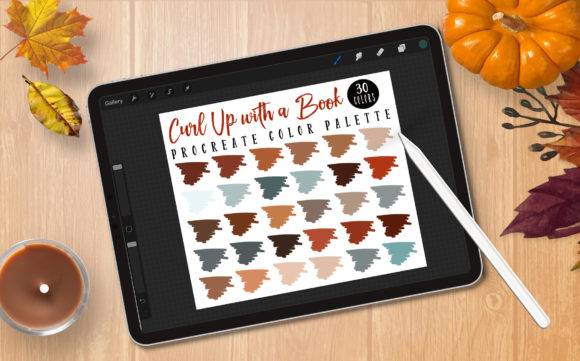
There is a distinct rhythm to the creative process that often halts not because of a lack of skill, but because of decision fatigue. When you sit down to illustrate, design a social media graphic, or sketch a concept, the last thing you want to do is spend twenty minutes hunting for the right shade of burnt orange or muted teal. This is where having a curated set of tools becomes essential. The Procreate Palette - Curl Up with a Book was designed specifically to eliminate that friction, offering a pre-selected range of thirty colors that evoke the warmth and introspection of the cooler seasons.
As a Procreate fanatic, I created this color palette to help streamline your workflow. Having a solid color palette before you begin your project helps your creative flow without thinking about the right color swatch. Instead of fiddling with sliders and hue circles, you can dive straight into making marks. This collection captures the essence of autumn and winter, featuring deep browns, soft creams, dusty reds, and cool grays that mimic the feeling of settling in with a good novel while the weather turns crisp outside.
Why Color Consistency Matters in Digital Art
In the world of digital illustration and design, consistency is often the marker of professionalism. Whether you are a freelancer building a brand identity for a client or a hobbyist creating a series of Instagram posts, using a cohesive color scheme ties your work together. The Curl Up with a Book palette provides that anchor. By limiting your choices to thirty thoughtfully selected hues, you force yourself to work within a harmonious framework. This constraint often breeds creativity rather than stifling it, as you learn to mix and layer these specific tones to create depth and variation.
For marketers and small business owners, this approach is particularly valuable. Seasonal campaigns require visuals that resonate emotionally with the audience. Colors associated with autumn and winter—warmths that suggest comfort and cools that suggest quiet reflection—can significantly impact how a message is received. Using a dedicated palette ensures that your holiday promotions, blog headers, or product mockups maintain a unified look across different platforms.
Practical Applications for Creators and Entrepreneurs
The versatility of this palette extends far beyond simple sketching. Because the colors are balanced between warm and cool tones, they adapt well to various mediums and project types. Here are several ways different users can leverage this tool:
- Digital Illustrators: Use the darker shades for line art and the mid-tones for flat coloring. The lighter creams and soft grays make excellent highlights, giving your characters a soft, storybook quality.
- Bloggers and Content Creators: Create custom graphics for articles about reading lists, cozy lifestyle tips, or seasonal recipes. The palette naturally complements photography featuring coffee, knitted textiles, and indoor plants.
- Educators and Publishers: Design worksheets, e-book covers, or educational materials that need to feel inviting rather than sterile. The earthy tones reduce eye strain and create a welcoming learning environment.
- Freelance Designers: Incorporate these swatches into mood boards for clients looking for "hygge" or rustic aesthetics. It serves as a quick starting point for branding projects in the literary or hospitality sectors.
You can use the brushes to create your own illustrations, color in line art, or other creative products. There are no limits to your creativity. The key is to treat the palette as a foundation, not a cage. Experiment with opacity settings in Procreate to blend these colors into entirely new shades while maintaining the underlying temperature of the original set.
Technical Requirements and Setup
To get the most out of this resource, you need the right environment. This palette is built exclusively for the Procreate ecosystem on iPad. It leverages the specific way Procreate handles color data, ensuring that the swatches appear exactly as intended. Please note that if you don't have Procreate, these files will NOT work elsewhere. They are not compatible with Photoshop, Illustrator, or other desktop-based design software in their current .swatches format.
Required Equipment:
- iPad Pro or any compatible iPad model.
- Procreate Version 5.0 and higher. Older versions may not support the updated swatch file structure.
Optional but Recommended:
- Apple Pencil or a stylus that supports pressure sensitivity. This allows you to utilize the full dynamic range of Procreate's brushes when applying these colors.
Installation is straightforward, but for those new to the app, instructions are included in the download package. Generally, you will import the .swatches file directly into the Color Library panel within Procreate. Once imported, the palette appears as a new tab, ready for immediate use. Keeping your library organized by importing seasonal palettes like this one ensures you always have the right tools at hand when inspiration strikes.
Licensing and Commercial Use
Understanding the rules of usage is vital for professionals who intend to monetize their work. This palette is designed to support your commercial endeavors. You are free to use the colors in projects that generate income, such as client commissions, printed merchandise, or digital assets sold on marketplaces. The goal is to empower your business, not restrict it.
However, there is a crucial distinction regarding the asset itself. While you can sell the art you create with these colors, you cannot sell or giveaway the palette or the .swatches file. The intellectual property of the color arrangement belongs to the creator. This protects the value of the original work while allowing you full freedom to apply it. Respecting these boundaries ensures that creators can continue to share high-quality resources with the community.
Making the Most of Your Creative Session
When you open Procreate with the Procreate Palette - Curl Up with a Book loaded, try setting an intention for your session. Are you sketching a character wrapped in a blanket? Designing a logo for a local bookstore? Creating a pattern for winter stationery? Having a clear goal combined with a restricted color set can accelerate your output.
Consider creating a "test sheet" before starting your final piece. Dedicate one layer to scribbling, blending, and testing how the thirty colors interact. See how the deep chocolate brown looks against the slate gray, or how the terracotta pops when placed next to the pale cream. This small step saves time later and helps you visualize the final composition. It also helps you discover unique combinations you might not have considered initially.
Ultimately, tools like this are about removing barriers between your imagination and the canvas. By handling the technical aspect of color selection, this palette allows you to focus on composition, storytelling, and texture. Whether you are a seasoned designer or just picking up a stylus for the first time, having a reliable, beautiful set of colors can make the difference between a stalled project and a finished masterpiece. Embrace the season, organize your digital workspace, and let these colors guide your next creative breakthrough.