Evaluating the Magic Christmas Lights Design Collection
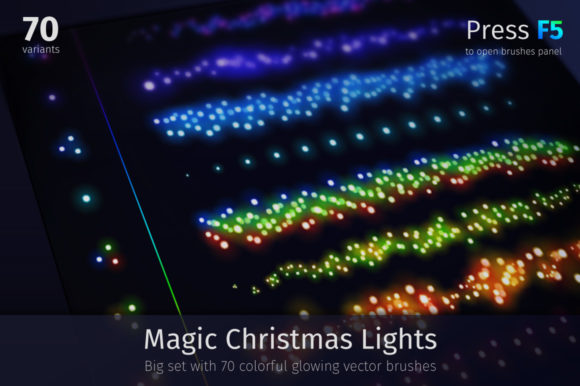
For graphic designers, illustrators, and hobbyists preparing holiday-themed projects, selecting the right digital assets is a critical step in the workflow. The Magic Christmas Lights collection represents a specific category of design resources aimed at streamlining the creation of festive visuals. This set includes 70 colorful glowing light elements, abstract blurred vector brushes, and a comprehensive library of PNG files. Understanding the technical specifications, versatility, and limitations of this collection is essential for determining whether it aligns with your specific project requirements.
Understanding the Core Components
The Magic Christmas Lights package is designed to provide a versatile toolkit for creating celebratory designs. At its core, the collection offers a big set of 70 distinct, colorful glowing lights. These are not static images but are engineered to be customizable. The inclusion of bright, abstract blurred vector brushes allows users to generate light trails, bokeh effects, and intricate patterns quickly.
Technically, the collection is divided into several key formats to accommodate different software environments and skill levels:
- Vector Files: The set includes 16 EPS10 files, ensuring compatibility with a wide range of vector editing software beyond just the latest versions.
- Illustrator Brushes: There are 3 AI CS5 files containing pattern brushes for fireworks, banners, and other magical elements. Crucially, these items are not expanded, meaning they remain fully editable vector objects.
- Raster Images: For users who do not utilize Adobe Illustrator, the package provides over 170 print-resolution transparent PNG files. These cover a variety of shapes created with the magic brush strokes.
- Previews: Preview JPG files are included to help users visualize the assets before implementation.
Key Benefits for Holiday Projects
One of the primary advantages of the Magic Christmas Lights set is its adaptability across different design scenarios. Whether you are designing greeting cards, illustrations, web banners, or print media, the variety of formats ensures that the assets can be integrated seamlessly. The pressure-sensitive version of the brushes is a significant feature for users with drawing tablets, allowing for dynamic stroke width and opacity that mimics natural hand movements. This capability adds a layer of organic realism to digital illustrations that pre-rendered static images often lack.
Furthermore, the ability to change the color stroke offers extensive creative control. Instead of being locked into a single color palette, designers can modify the hues to match specific brand guidelines or thematic requirements, such as traditional red and green or a modern icy blue and silver scheme. The transparency modes are another critical aspect; the brushes are optimized to glow most effectively when set to blending modes like Color Dodge, Hard Light, or Overlay. This technical detail saves time during the post-processing phase, as the assets are pre-configured to interact realistically with background layers.
Technical Considerations and Tradeoffs
While the collection offers robust features, potential users must evaluate their current software ecosystem. The vector brushes and AI files require Adobe Illustrator (specifically CS5 or later) to leverage the full pressure sensitivity and editability of the non-expanded objects. If your workflow relies exclusively on raster-based software like Photoshop or free alternatives that do not support AI brush presets, the utility of the vector component diminishes. However, the inclusion of over 170 high-resolution PNGs mitigates this tradeoff, ensuring that users without Illustrator can still utilize the majority of the visual assets effectively.
Another consideration is the learning curve associated with blending modes. To achieve the intended "glowing" effect described in the product documentation, users must understand how to apply transparency modes correctly. If a user places these elements on a white background with normal opacity, the magical glow effect will be lost. Therefore, a basic understanding of layer interactions is necessary to maximize the value of this set.
Ideal Use Cases
This collection is a strong fit for several specific situations:
- Greeting Card Design: The high-resolution PNGs and vector scalability make these lights ideal for both digital e-cards and physical print runs where clarity is paramount.
- Custom Illustrations: Artists looking to add festive ambiance to existing characters or scenes can use the pressure-sensitive brushes to weave light strands naturally through the composition.
- Marketing Materials: Businesses needing quick turnaround times for holiday banners or social media graphics can utilize the pre-made patterns and fireworks brushes to create eye-catching headers without starting from scratch.
- Scrapbooking and Digital Crafts: The variety of shapes and the transparent backgrounds allow for easy layering in digital scrapbooking projects.
When to Consider Alternatives
Despite its comprehensive nature, Magic Christmas Lights may not be the optimal choice for every scenario. If a project requires photorealistic 3D rendering of light sources with complex physics simulations, a dedicated 3D asset library or procedural generation tool might be more appropriate. Similarly, if a designer needs animated light sequences for video production, this static vector and raster set would require significant additional work in animation software to bring the elements to life.
Additionally, users who strictly adhere to open-source software ecosystems might find the reliance on proprietary AI brush formats limiting, even with the PNG fallback. In such cases, a collection offering SVG or GIMP-native brush formats might offer a smoother workflow integration.
Making the Decision
Selecting the right design assets ultimately depends on balancing immediate needs with long-term flexibility. The Magic Christmas Lights collection distinguishes itself by offering a hybrid approach: it caters to professional vector artists seeking deep customization while simultaneously providing ready-to-use raster assets for generalists. The inclusion of both EPS10 and AI CS5 files demonstrates an awareness of diverse user bases, bridging the gap between legacy systems and modern workflows.
Before purchasing or downloading, evaluate your current project timeline. If you need to produce high-quality, glowing holiday visuals quickly and possess at least a fundamental knowledge of layer blending modes, this set provides a efficient solution. The ability to experiment with different transparency modes and the sheer volume of 186 separately transparent files offer a high return on investment for seasonal design work. However, if your workflow is entirely video-based or strictly limited to non-Adobe environments without the capacity to handle large PNG libraries, further research into specialized alternatives may be warranted.
In conclusion, this collection serves as a practical, versatile resource for enhancing holiday projects. By understanding the interplay between the vector brushes, the pressure sensitivity features, and the raster backups, designers can make an informed decision that best supports their creative goals. For those ready to elevate their festive designs with customizable, glowing elements, this set offers a solid foundation for creativity.