Mastering Realistic Rock Textures with Brushstrokes Imitating Stone
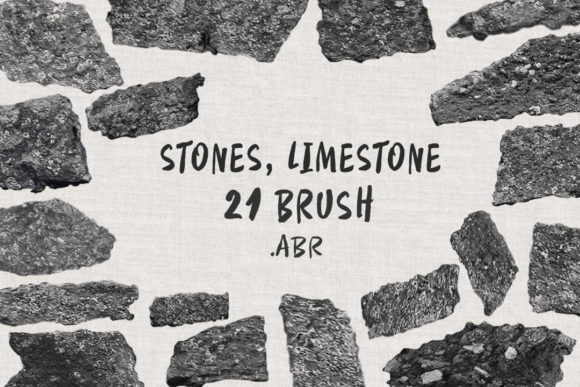
Creating convincing geological textures in digital art is often one of the most time-consuming aspects of concept design, illustration, and architectural visualization. Artists frequently struggle to balance the need for high-fidelity detail with the efficiency required to meet tight deadlines. Hand-painting every crevice, grain, and weathered edge of a limestone wall can take hours, often resulting in a look that feels too uniform or digitally sterile. This is where specialized tools like Brushstrokes Imitating Stone become essential. By leveraging a curated set of 20 realistic brushes designed specifically to mimic the organic irregularity of rock, digital creators can bypass the tedious groundwork and focus on composition, lighting, and storytelling.
The primary challenge for many digital painters is achieving natural variation. Real stone is never perfectly smooth; it is a complex interplay of erosion, mineral deposits, and structural fractures. When an artist attempts to replicate this using standard round or square brushes, the result often lacks the necessary depth. The Brushstrokes Imitating Stone collection addresses this by providing pre-configured texturing capabilities that react dynamically to pressure and tilt. Whether you are working in Adobe Photoshop or Procreate, these tools allow you to lay down complex surface details in a single stroke, significantly accelerating the workflow while maintaining a hand-crafted aesthetic.
Overcoming the Limits of Digital Geology
For environment artists and matte painters, the goal is often immersion. A background that looks "painted" can break the viewer's suspension of disbelief. The need here is not just for a texture overlay, but for a method of painting that respects the physical properties of the material. Limestone, in particular, presents unique challenges due to its sedimentary nature, characterized by subtle layering and porous surfaces. Generic texture stamps often fail because they repeat patterns or do not blend well with underlying colors.
Using Brushstrokes Imitating Stone solves these issues by offering a dynamic painting experience rather than a static stamping process. Because these brushes are built to respond to your input, no two strokes are exactly alike. This variability is crucial for breaking up repetitive patterns that plague digital environments. Instead of spending twenty minutes masking and blending a photo texture, an artist can use these brushes to build up the rock face organically, ensuring that the light and shadow interact naturally with the simulated surface geometry.
Versatility Across Software Platforms
One of the standout features of this resource is its cross-platform compatibility. The package includes a ZIP folder containing 20 distinct brushes available in the universal .ABR format. This ensures seamless integration whether your preferred canvas is the robust, layer-heavy environment of Photoshop on a desktop or the intuitive, touch-based interface of Procreate on an iPad. The installation process is streamlined into a single file, removing the friction of managing multiple downloads or incompatible formats.
For Photoshop users, these brushes integrate directly into the brush preset manager, allowing for immediate access alongside existing toolsets. The engine behind these brushes leverages Photoshop's advanced scattering and texture dynamics to simulate the granular feel of limestone. Similarly, Procreate users benefit from optimized stroke stabilization and pressure curves that feel native to the Apple Pencil. This flexibility means that freelancers and studio artists can maintain a consistent visual style regardless of the device they are using at the moment, ensuring project continuity from sketch to final render.
Practical Applications and Creative Control
The utility of Brushstrokes Imitating Stone extends far beyond simple background filling. Concept artists can use these tools to rapidly iterate on different architectural styles, testing how ancient ruins might look against a modern skyline. Game developers can utilize them to create unique asset textures for low-poly models, adding high-frequency detail without increasing polygon counts. Furthermore, illustrators working in fantasy genres can create magical monoliths or dragon lairs that feel grounded in reality despite their fantastical context.
A critical aspect of these brushes is their color agnosticism. Unlike some texture tools that come baked with specific gray or brown tones, these brushes inherit the foreground color selected by the user. This offers immense creative freedom. If your scene requires a fiery red sandstone cliff, you simply select a red hue, and the brush applies the limestone texture in that spectrum. Need a gloomy, wet black slate for a horror setting? Switch to black. This dependency on user color settings ensures that the brushes adapt to the lighting conditions of your specific artwork, rather than forcing your artwork to adapt to the brush.
Technical Specifications and Usage Tips
Understanding the technical parameters of your tools is vital for maximizing their potential. The brushes in this collection vary in size from 395 to 1055 pixels. This range is intentionally designed to cover both broad surface areas and finer detailing work. The larger sizes are ideal for blocking in the main shapes of a rock formation or covering large walls quickly, while the smaller sizes allow for precise definition around edges, cracks, and focal points.
To get the best results, it is recommended to vary your pressure and stroke direction. Since real limestone forms in layers, dragging the brush horizontally can simulate sedimentary bands, while circular motions can create weathered, eroded pockets. Combining different brushes from the set of 20 can also yield superior results; try using a coarse brush for the base layer and a finer, more detailed brush for the highlights. Remember that opacity and flow settings play a significant role. Lowering the flow allows you to build up the texture gradually, creating a sense of depth that mimics the translucency found in certain types of stone.
Tailoring the Approach to Your Workflow
Different artists will approach Brushstrokes Imitating Stone based on their specific end goals. A matte painter working on a photorealistic film shot might use these brushes sparingly, focusing on blending them seamlessly with photographic elements to add grit and wear. In contrast, a stylized character artist might use them aggressively to define the silhouette of a stone golem, embracing the visible brushwork as part of the aesthetic.
Architectural visualizers will find particular value in the consistency these brushes provide. When presenting a design to a client, having a reliable way to generate realistic masonry or landscaping elements can make the difference between a flat rendering and a compelling proposal. By mastering these 20 brushes, professionals can reduce their rendering times and increase the variety of materials they can present without needing to source external texture libraries for every new project.
Ultimately, the value of this toolset lies in its ability to bridge the gap between technical efficiency and artistic expression. It removes the barrier of entry for creating complex geological forms, allowing artists of all skill levels to produce professional-grade stone textures. Whether you are designing a video game environment, illustrating a graphic novel, or visualizing a building facade, Brushstrokes Imitating Stone provides the practical solution needed to bring your rocky landscapes to life with authenticity and speed.