The Procreate Glitter Box: A Practical Guide to Digital Sparkle
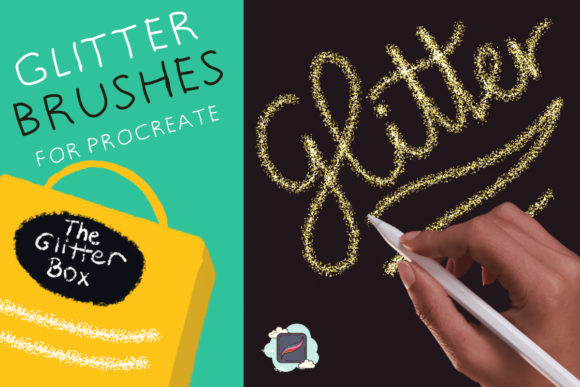
Digital illustration often strives for texture and depth, mimicking the tactile feel of traditional media. For artists using iPads, achieving a convincing glitter effect can be challenging without the right tools. The Procreate Glitter Box addresses this specific need by offering a curated collection of brushes designed to simulate shimmering particles within the Procreate application. This set, which includes 15 distinct glitter brushes, provides a streamlined way to add luminosity to artwork without requiring complex layer blending modes or manual particle placement.
Understanding the Toolset
The core of The Procreate Glitter Box is its variety. Rather than relying on a single brush with adjustable settings, this set provides 15 unique options, each engineered to produce different types of sparkle. Some brushes mimic fine, dust-like glitter suitable for subtle highlights, while others create larger, chunkier flakes reminiscent of craft glue or holographic foil.
A critical feature of these brushes is their responsiveness to size adjustments. Users are encouraged to play with the size of each brush to achieve nice and unique effects. A small stroke might look like a delicate stardust trail, whereas increasing the brush size can transform the same tool into a bold, textured wash. This scalability allows a single brush to serve multiple functions within a piece, reducing the need to switch tools constantly during the creative process.
Primary Applications and Use Cases
The versatility of the brush set makes it applicable across several digital art disciplines. Understanding where these tools fit best helps artists determine if they align with their current workflow.
- Create Illustrations: In character design or fantasy landscapes, lighting plays a crucial role. These brushes allow artists to paint magical auras, reflective armor, or sparkling water surfaces efficiently. The texture adds a layer of realism that flat colors often lack.
- Create Patterns: Surface pattern designers can use these tools to generate seamless repeats for textiles or wallpapers. By varying the opacity and size, one can create dense, all-over prints or sparse, elegant motifs that catch the eye.
- Create Lettering: Hand-lettering artists often seek ways to make titles pop. Applying a glitter texture to specific strokes or flourishes can create a focal point without overwhelming the legibility of the text.
Beyond these primary categories, the brushes are useful for adding finishing touches to greeting cards, social media graphics, and concept art. The ability to quickly deposit texture saves time compared to importing photos of real glitter and masking them manually.
Evaluating the Benefits
The primary advantage of The Procreate Glitter Box is efficiency. Creating realistic glitter from scratch in Procreate involves selecting appropriate grain sources, adjusting streamline settings, and tweaking dual brush parameters—a process that can be technical and time-consuming. This set bypasses that learning curve, offering ready-to-use tools that work immediately upon import.
Furthermore, the performance of these brushes is generally optimized for the iPad. Poorly made custom brushes can lag or cause stuttering when painting large areas. A well-constructed set ensures smooth strokes even at high resolutions, maintaining a fluid drawing experience. The variety within the 15-brush set also means artists can find a specific "glitter personality" that matches their style, whether they prefer soft glows or sharp, geometric reflections.
Considerations and Tradeoffs
While the toolset offers significant convenience, there are tradeoffs to consider. Relying heavily on pre-made texture brushes can sometimes lead to a homogenized look if not used thoughtfully. Because many digital artists have access to similar popular brush sets, there is a risk that artwork may appear generic if the glitter effect is applied uniformly without customization.
Additionally, texture brushes can increase file size. Layers containing heavy glitter textures, especially when used at large canvas sizes, consume more memory. Artists working on complex compositions with dozens of layers should monitor their layer count and canvas dimensions to prevent performance issues. It is often advisable to rasterize glitter layers once the positioning is final to free up resources for further editing.
Another consideration is color interaction. Glitter is inherently reflective; it does not just have a color but also reflects light. While these brushes simulate brightness, they may not automatically adjust to the lighting direction of the rest of the painting. Artists may need to manually add shadows or highlights over the glitter layers to ensure the sparkle integrates convincingly with the scene's light source.
When This Set Is a Strong Fit
The Procreate Glitter Box is an ideal choice for illustrators who frequently incorporate magical or celebratory elements into their work. If your portfolio includes themes involving fantasy, holidays, beauty products, or party invitations, having a dedicated set of reliable glitter brushes streamlines production. It is also highly beneficial for beginners who want to achieve professional-looking textures while they are still mastering the intricacies of Procreate's brush engine.
It is equally valuable for professionals working under tight deadlines. When client revisions require quick changes to lighting or texture, having a preset library allows for rapid iteration. Instead of rebuilding a glitter effect from scratch, the artist can simply swap brushes or adjust sizes to meet the new visual requirements.
When to Consider Alternatives
Conversely, this set may be less essential for artists whose style relies on flat design, minimalism, or strictly vector-like aesthetics where texture is intentionally avoided. If your work focuses on clean lines and solid blocks of color, adding glitter might contradict your artistic goals.
Moreover, advanced users who enjoy technical customization might prefer building their own brushes. Creating a custom brush allows for total control over the shape, scatter, and rotation of the glitter particles, ensuring a truly unique signature style that cannot be replicated by a downloaded pack. For those who view brush creation as part of their artistic practice, investing time in learning the Brush Studio may yield more long-term value than purchasing a pre-made set.
Making the Decision
Deciding whether to integrate The Procreate Glitter Box into your workflow depends on your specific project needs and artistic priorities. If you value speed, consistency, and immediate access to high-quality textures, this set offers a practical solution. It removes technical barriers, allowing you to focus on composition and color theory.
However, if uniqueness and total technical control are your highest priorities, you might view this set as a starting point rather than a final solution. You can use these brushes as a base, modifying their settings in the Brush Studio to create hybrid tools that better suit your specific vision.
Ultimately, the utility of the 15 glitter brushes lies in how they are applied. By experimenting with size, opacity, and layer blending modes, artists can transcend the limitations of a standard brush pack. Whether used for intricate lettering, expansive patterns, or detailed illustrations, these tools provide a robust foundation for adding sparkle to digital art, provided they are used with intention and awareness of their impact on the overall composition.