Procreate Palette - Changing Leaves for Autumn Art
There is a specific kind of friction that happens when you are deep in the creative zone, only to be stopped cold by the need to pick a color. You have your line art ready, your composition is solid, but then you spend twenty minutes tweaking hue and saturation sliders trying to find that perfect rust orange or muted olive green. By the time you find it, the momentum is gone. This is exactly why curated tools like the Procreate Palette - Changing Leaves exist. It is not just a collection of colors; it is a workflow solution designed to keep your artistic focus exactly where it belongs: on the illustration itself.
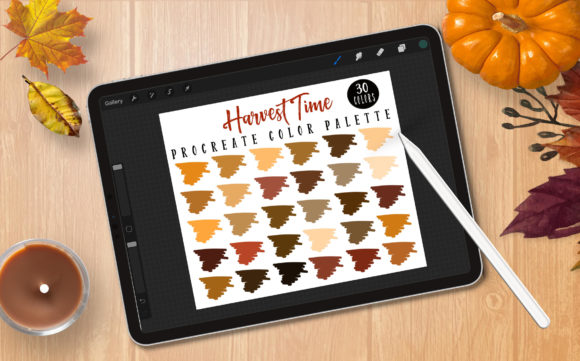
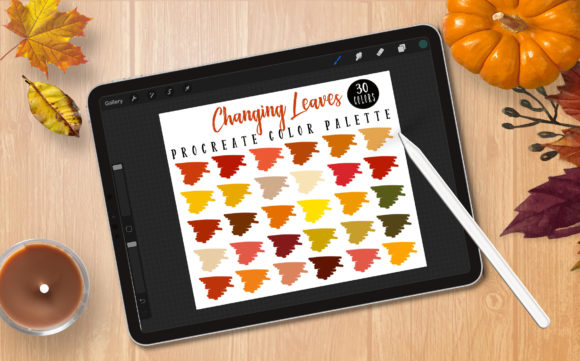
For digital artists working within the Procreate ecosystem, having a pre-defined set of harmonious colors can transform the coloring process from a chore into a seamless extension of your creativity. The Changing Leaves palette was created with this specific goal in mind. As a tool built by a Procreate fanatic for fellow creators, it offers thirty distinct shades inspired by the natural transition of autumn foliage. These aren't random picks; they are carefully selected to work together, ensuring that whether you are painting a landscape, designing a seasonal logo, or illustrating a children's book character, your final piece has a cohesive and professional look right from the first stroke.
Streamlining Your Creative Workflow
The primary value of using a dedicated swatch file lies in efficiency. When you start a project with a solid color palette already loaded into your library, you eliminate decision fatigue. Instead of wondering if a specific brown complements your background, you simply tap a swatch from the Procreate Palette - Changing Leaves set and continue working. This reduction in micro-decisions allows your brain to stay engaged with the broader artistic vision rather than getting bogged down in technical adjustments.
Consider the scenario of a freelance illustrator facing a tight deadline for a fall-themed editorial piece. Without a preset palette, they might waste valuable billable hours color-testing. With this palette, the foundational tones of burnt sienna, goldenrod, and deep forest green are immediately available. This efficiency doesn't just save time; it often improves the quality of the work because the artist remains in a state of "flow" rather than constantly switching contexts between painting and color theory analysis.
Ideal Applications for Seasonal Projects
While the name suggests a strict limitation to autumn themes, the utility of these thirty colors extends further than just pumpkins and falling leaves. The earthy tones and warm gradients found in the Changing Leaves palette are incredibly versatile for any project requiring warmth, nostalgia, or organic textures. Marketers and social media managers can use these hues to create cohesive seasonal campaigns that resonate emotionally with audiences during the cooler months. Bloggers and content creators can utilize these swatches to design custom headers, icons, or hand-lettered quotes that feel authentic and inviting.
Educators creating digital materials for classrooms will also find this palette useful. The colors are vibrant enough to engage students but muted enough to remain easy on the eyes when viewed on screens for extended periods. Whether you are coloring in complex line art for a mindfulness activity or creating visual aids for a lesson on nature cycles, having a unified color scheme helps maintain visual consistency across all your materials.
Technical Requirements and Compatibility
It is crucial to understand the technical environment required to make the most of this tool. The Procreate Palette - Changing Leaves is distributed as a .swatches file. This is a proprietary file format specific to the Procreate application on iPad. Consequently, this palette will only work if you are using an iPad (such as an iPad Pro or standard iPad) with Procreate version 5.0 or higher installed.
If you are working on an Android tablet, a desktop computer, or using different illustration software like Photoshop or Clip Studio Paint, these files will not function. This is a common point of confusion for new digital artists, so it is worth emphasizing: the .swatches format is locked to the Procreate ecosystem. However, for those who do meet the requirements, the integration is seamless. The package includes clear instructions on how to import the file, ensuring that even users who are new to managing custom assets in Procreate can get set up quickly without frustration.
To fully leverage the potential of these colors, pairing them with a pressure-sensitive stylus like the Apple Pencil is recommended, though not strictly mandatory. Pressure sensitivity allows for more dynamic brushwork, letting the varying opacities and blends of the Changing Leaves colors shine through in ways that finger painting simply cannot replicate.
Commercial Use and Licensing Guidelines
One of the significant advantages of this resource is its flexibility regarding commercial application. Creators, small business owners, and entrepreneurs can confidently use the colors from this palette in products they intend to sell. Whether you are designing t-shirts, printing stickers, creating digital planners, or illustrating covers for self-published books, the colors themselves are cleared for commercial use. There are no limits to the creative products you can generate using these swatches.
However, there is a vital distinction to make regarding intellectual property. While you can sell the artwork you create with the palette, you cannot sell or give away the .swatches file itself. The palette file remains the property of the creator. This means you cannot include the raw color file as a bonus item in your own product bundles or resell it as a standalone asset. This restriction protects the effort put into curating the specific color harmony while still granting users full freedom to profit from their own artistic output.
Maximizing the Value of Your Swatch Library
Integrating the Procreate Palette - Changing Leaves into your regular workflow is about more than just having pretty colors; it is about building a reliable toolkit. Over time, as you become familiar with these thirty specific shades, you will develop an intuition for how they interact. You will know exactly which swatch to grab for a shadow tone and which one works best for a highlight without even looking at the screen. This familiarity breeds speed and confidence.
Furthermore, this palette serves as an excellent educational tool for understanding color harmony. By studying how the creator balanced the warm oranges against the cooler greens and neutral browns, hobbyists and students can learn valuable lessons about complementary and analogous color schemes. It provides a safe sandbox to experiment with blending modes and layer effects, seeing how these specific pigments react under different digital lighting conditions.
In a digital landscape saturated with generic tools, finding resources that are thoughtfully curated makes a tangible difference in your daily output. The Changing Leaves palette removes the guesswork from seasonal coloring, allowing you to focus on storytelling and technique. Whether you are a seasoned professional looking to speed up your client work or a hobbyist eager to capture the beauty of autumn in your sketches, this set of thirty colors offers a practical, high-quality foundation for your next masterpiece. Just remember to keep your software updated and your device compatible, and you will be ready to paint the season in no time.